Cross Stitch Saga (IPAD/IPHONE) REPLACEMENT: StitchSketch ($8) – 8/10 Following Cross Stitch Saga’s removal from the apple store, the best alternative is StitchSketch a paid alternative from the makers of KGchart. I’ve also created a great infographic on which is the best cross stitch pattern software for easy selection. FlossCross - Make your own cross stitch pattern. Free online tool. Make your own cross stitch pattern en help. Empty slot New From Image.
- Cross Stitch Program Mac Free Pdf
- Winstitch Cross Stitch Pattern Maker
- Cross Stitch Program Mac Free Online
Cross Stitch Pattern Maker free download - Stoik Stitch Creator, ArcSoft Panorama Maker, Design Cross Stitch Pattern, and many more programs. MacStitch for the Mac and WinStitch for PC. This cross stitch software is used to design your own cross stitch, tapestry, bargello, or knitting designs. You can use clip art, digital photos, or scanned photographs to convert into cross stitch patterns. We supply software for PC. Cross Stitch Software MacStitch and WinStitch Over the last 25 years, we have developed MacStitch (for Apple Macs) and WinStitch (for Windows machines). Same great app, one for each kind of computer! Current Version: 2021 (V16.x) - Mac works on all OSX from 10.9 onwards including Catalina/Big Sur and M1 devices.
Site showing 'Not Secure'? Click here for the secure version
Craft Software for Everyone
If you are looking for great Cross Stitch / Tapestry / Crochet / Diamond Stitching software at a great price, we have what you are looking for.
Whether you plan to convert photos into charts, or design fantastic pieces by hand, our software has been developed over 25 years in conjunction with small business owners all over the globe,to provide you the tools you need to do the job.
#communityovercompetition
Cross Stitch
MacStitch for (for OSX 10.10 upwards inc Big Sur and M1 devices) and WinStitch (for Windows 7/8/10 on intel devices)
Our flagship applications: primarily designed to allow you to create and print or publish easy to read cross stitch designs, either converted from photos / clip art, or drawn by hand. Work in color, black and white, a mixture of both, or simulated stitching on screen.
Print to paper up to A2 in size, with lots of options, and see the app work out how much thread you will need.
Export to PDF files to sell your work online.
Add colorways so that you can offer a choice of finish.
Crochet
Prefer to crochet the patterns?
 We have a variety of output styles for crochet users who want to take that pattern and print or export a chart that describes the work in words (Tunisian Crochet)
Working L/R or R/L, alternating, or C2C (corner to corner) , with a choice of worded output or colored blocks with a stitch count.
What used to be a very time consuming charting task is now a few moments work
Diamond Painting
Diamond Painting is a great new way of working. Plastic 'beads' are available (usually 1/10 inch in size), in common DMC shades.
Design or import a picture using shades based on DMC (use 'Diamonds.threads') , and you can view and print at 1/10 inch sizes onto paper, ready to have adhesive applied.
Cross Stitch Program Mac Free Pdf
Then stick the beads over the printed design and Voila!Stitch Layout
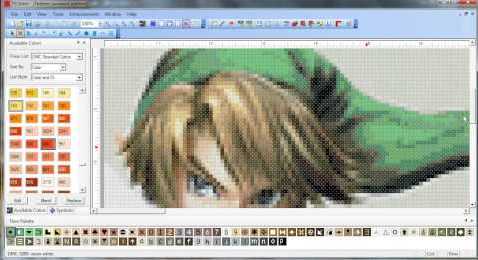
Winstitch Cross Stitch Pattern Maker
StitchGraph for OSX and WindowsOur new software for laying out Stitch Diagrams, Hardanger work, and other designs that need to state the sequence of stitching.
Allows you to simply show people how to do your favourite stitch. The colours and labelling are all customisable.
You can create new stitch layouts for many different styles of stitch work.
This product is new and unique to the Mac, and very competitively priced too! (Similar products on Windows can cost up to $299!)
iPad & iPhone
XStitch Markup
FREE* iOS App ‘Cross Stitch Markup’
Cross Stitch Program Mac Free Online
*No ads, no banners, no in-app purchases and no nagging to upgrade.Not a designing app.. this will allow you to 'stitch on the move'.. you can open MacStitch and WinStitch charts (and PCStitch charts up to version 7), and mark them up on screen instead of working from paper.