Feb 01, 2021 This software for Mac OS X was originally created by SpeedBit Ltd. The unique ID for this app's bundle is com.speedbit.va. The most popular versions among the application users are 3.2 and 3.1. ABT Data Consulting has released what they describe as “the best all time download accelerator/manager for the Mac OS:” Speed Download 1.5. “Ready for Mac OS X, this utility installs no. An eGPU can give your Mac additional graphics performance for professional apps, 3D gaming, VR content creation, and more. FlareGet is a full featured, multi-threaded download manager and accelerator for Windows, Mac and Linux. Mac OS X 10.7+ and almost all 32 and 64 bit Debian, RPM.
The Mac OS X series is one of the best line up series of the operating systems. the tenth edition in the series is the Mac OS X Yosemite. The biggest and most advantageous part of the Mac OS X series is that the versatility of the operating systems in making the user is more comfortable in using the system is high compared to that of the other range of OS series. There are a lot of tweaks in terms of performance by the operating system that defines them apart from the rest of the operating systems. There are a lot of improvements to the existing operating system from the existing ranging from appearance changes to adaptation changes.
License
Official Installer
May 15, 2016 Mac OS X 10.10.1 Yosemite Free Downloads: From CrackSoftPC.Com you can Download the latest ISO version Mac OS X 10.10.1 Yosemite. Using you can get safe official Mac OS X Yosemite 10.10.1 offline installer.Yosemite upgrades various improvements over previous versions. It is the most prominent being the introduction of FaceTime.
File Size
4.82GB
Language
English
Developer
Apple Inc.
Why Mac OS X Yosemite?
Well the mac OS X series is very well known by the users when it comes to the hardcore performance of the machine when installing with the operating system. when the update was released the upgrade received a very good response from its users. Even though a few bugs were spotted here and there, the performance dragged across the par performance line.
The winning streak was that the update didn’t slow the processor of the system, which is a common problem faced by many when it comes to upgrades. The upgrade was absolutely free to all the customers and is regarded as one of the best upgrades in recent times in the history of apple. Now you might wonder what is so great about this operating system that all the people are in praises about. Let me mention the key specifications that made the praises sound justified.
Features of the Mac OS X Yosemite
- The overall look of the graphical user interface went on a major upgrade making the output more premier and efficient.
- The mailbox is added with a mail drop feature which was anticipated by many.
- The photos option has been tweaked with a lot of upgrades and one such is that you can use the photos app to navigate across the pictures you have in your Mac system.
- The finder application is introduced to sort and find those hard to find files you have been looking for.
- Now connecting your iOS devices along with the Mac OS is pretty much easier to enable with seamless integration of iOS devices.
- The spotlight application has been tweaked to make sure there is more efficient performance when it comes to spotlighting search.
- Safari has become even safer and is now concerned even more about the privacy of your system on the internet. The firewall of the safari has been strengthened and the framework support has become rigid and defined.
- The Maverick application had many reported bugs with the previous update that has been rectified with the present update.
- The display performance is a bit in the darker mode that gives clarity to detail in the desktop output.
- The look of the application tiles has become flatter and the look looks more widened giving a jump start to the boring aesthetic appeal of the applications in the previous versions.
- The connectivity of the device has been enhanced to make sure that you can pair your Mac system with your favorite device and make your experience much more appealing.
The Mac OS X Yosemite has to be by far one of the most premier updates pulled off by apple. The end-user satisfaction is impeccable when it comes to apple performance ratings with the latest upgrades. there are some small specifications that you need to work on before you actually proceed ahead with the update.
The file size is about 4.80 GB and that is commutatively less when compared to the previous updates. This is a DMG installer package setup. This is compatible for 64 bit and 84 bits respectively and is compatible with almost all of the mac devices.
Download Mac OS X Yosemite 10.10 DMG direct file
Here are some of the steps that you can follow to download the Mac OS X Yosemite version onto your Mac system manually.
- Go to the website https://isoriver.com/category/mac-os/mac-os-x-yosemite-10-10/ and download the. DMG file from the site.
- If you are already a Mac user, then you don’t have to worry about this as the update is free and will automatically turn up if you are connected to a stable internet source.
- Specify the path in which you want to store the files and select OK.
- Once the installation is complete, the system needs to reboot to boot the newly installed operating system in the Mac.
You need to opt for the manual method only and only if you aren’t able to access the automatic update to the newer version. The Mac OS X Yosemite 10.10 version is by far the best in the range and will definitely help you adapt to it. It is considered as one of the best upgrades in recent times and will definitely help you to accomplish a lot in a smaller platform
Download Mac OS X Yosemite 10.10 ISO / DMG file direct for free
The Mac OS X series is one of the best line up series of the operating systems. the tenth edition in the series is the Mac OS X Yosemite. The biggest and most advantageous part of the Mac OS X series is that the versatility of the operating systems in making the user is more comfortable in using the system is high compared to that of the other range of OS series. There are a lot of tweaks in terms of performance by the operating system that defines them apart from the rest of the operating systems. There are a lot of improvements to the existing operating system from the existing ranging from appearance changes to adaptation changes.
Price Currency: USD

Operating System: Mac OS X Yosemite
Free mixing software for macos. Application Category: OS
4.9
Download Mac OS X Yosemite 10.10 ISO / DMG file direct for free
The Mac OS X series is one of the best line up series of the operating systems. the tenth edition in the series is the Mac OS X Yosemite. The biggest and most advantageous part of the Mac OS X series is that the versatility of the operating systems in making the user is more comfortable in using the system is high compared to that of the other range of OS series. There are a lot of tweaks in terms of performance by the operating system that defines them apart from the rest of the operating systems. There are a lot of improvements to the existing operating system from the existing ranging from appearance changes to adaptation changes.
Price Currency: USD
Operating System: Mac OS X Yosemite
Application Category: OS
Get Yosemite For Mac
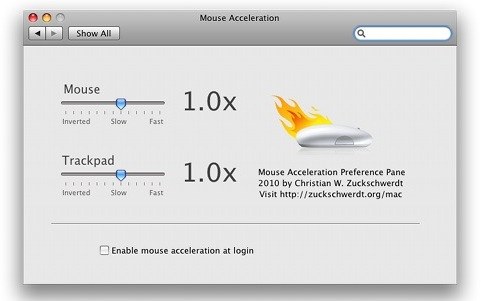
The Mouse Acceleration Preference Pane for Mac OS X is a GUI and startup item to set up an extended speed parameter and acceleration curve for your mouse.
Extended mouse settings
The Mouse Acceleration PrefPane is a GUI and startup item to Richard Bentley’s MouseFix.You can set up an extended speed parameter and acceleration curve for your mouse and touchpad.
- Increase mouse pointer precision
- Speed up your mouse movement
- Set mouse acceleration parameter
- Full control with just two simple knobs
History & Notes
For some time I’ve been offering a Preference Pane build around the OS X MouseFix by Richard Bentley.The API changed a bit with the release of 10.5 Leopard and then 10.6 Snow Leopard. It got worse each time.It’s limited to just a simple speed setting now. With a trick you can disable the acceleration, but that’s it.
Only the original version 1.0 is with explicit acceleration settings. With the current version try a inverted setting at about -1.0x.
See the older OS X Daily article for alternatives.
Get the current release
64bit binary
for Sierra
Make a Donation
If this free app is useful to you, maybe you want to buy me a beer? Cheers!

Older Downloads
32/64bit binary
for Leopard
Download Accelerator For Mac Free
Universal binary
for Tiger
License
This is Free Software for Mac OS X.Mouse Acceleration Preference Pane is free.You can use and redistribute it freely.
Mouse Acceleration Reviews
Here are some links to reviews and user opinons.
Download Accelerator Mac
Help threads on Steam: 12345
SuperUser: On Mac OS X Snow Leopard, is there a way to setup a different mouse tracking speed depending on the mouse that is connected?
SuperUser: Make Mac OS X mouse acceleration more Windows-like
Best Download Accelerator Windows 10
OS X Daily: Mouse Acceleration – what it is and how to adjust or disable it
MacDigger (Russian): A comparison of solutions
MacYourself: 5 Mac mouse-related utilities that alter acceleration, add features