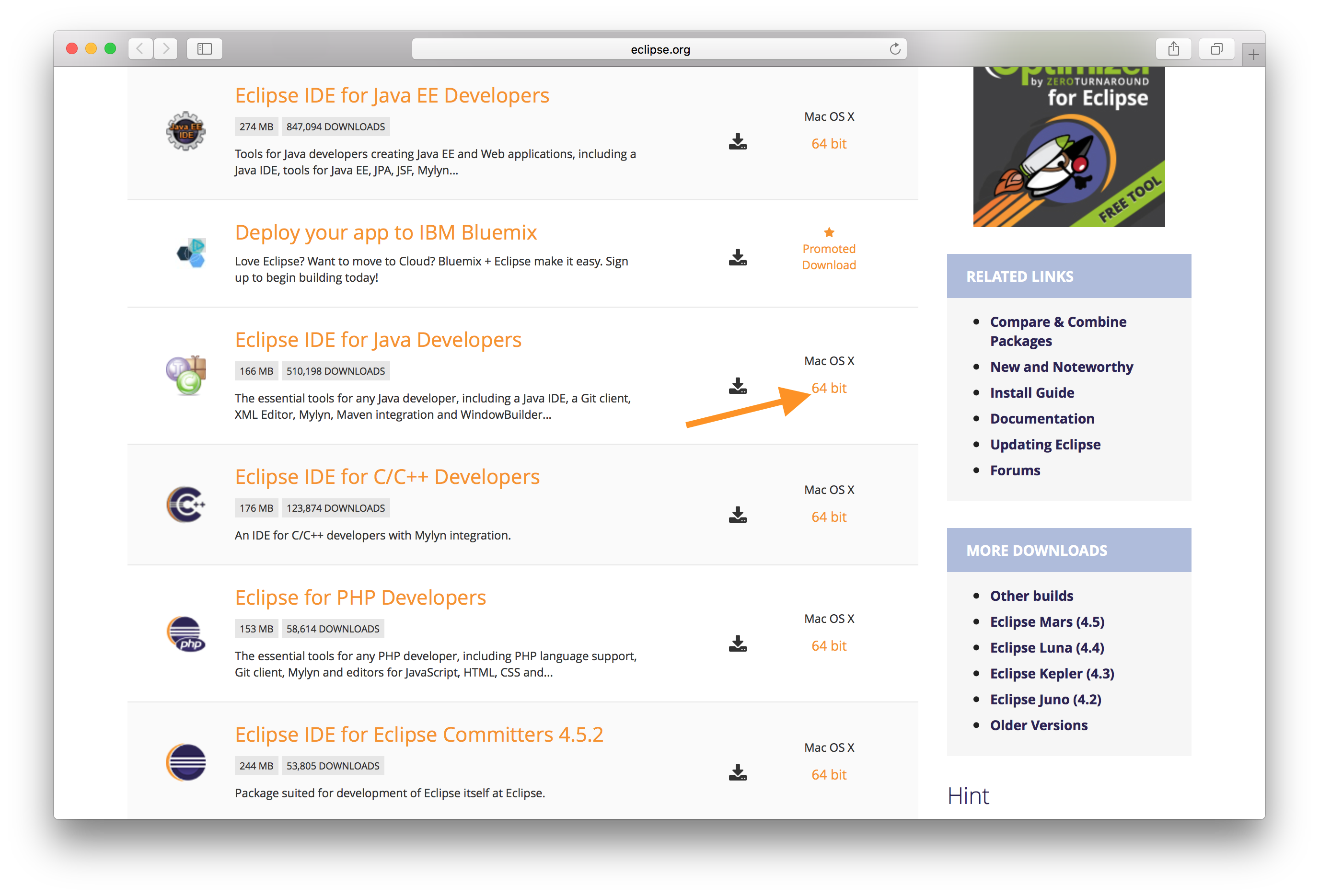
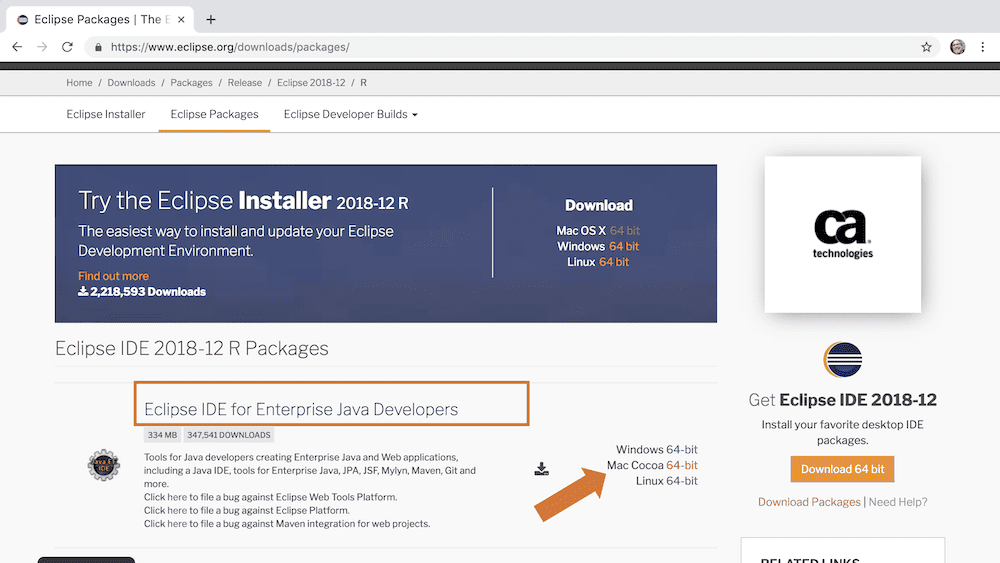
Link to How to install Java JDK on Mac OS Video tells you how to download Eclipse IDE for Mac or MacOS.In this tutorial, we. Eclipse is an OpenSource IDE and can be used to develop software in any language. Comparatively, It is one of the most widely adopted ides in the world. Eclipse is coupled with extensions and themes for almost everything, since its open-source, you can even develop your own Eclipse IDE themes.
Package Description
Package suited for development of Eclipse itself at Eclipse.org; based on the Eclipse Platform adding PDE, Git, Marketplace Client, source code and developer documentation.
Click here to file a bug against Eclipse Platform.
Click here to file a bug against Eclipse Git team provider.
This package includes:
- Eclipse Git Team Provider
- Eclipse Java Development Tools
- Mylyn Task List
- Eclipse Plug-in Development Environment
- Code Recommenders Tools for Java Developers
- org.eclipse.epp.package.committers.feature
- org.eclipse.epp.package.common.feature
- org.eclipse.platform
- org.eclipse.buildship
- org.eclipse.cvs
- org.eclipse.cvs.source
- org.eclipse.e4.core.tools.feature
- org.eclipse.egit
- org.eclipse.egit.mylyn
- org.eclipse.epp.package.common.feature
- org.eclipse.equinox.p2.user.ui
- org.eclipse.help
- org.eclipse.jdt
- org.eclipse.jdt.source
- org.eclipse.jgit
- org.eclipse.jgit.http.apache
- org.eclipse.mylyn.bugzilla_feature
- org.eclipse.mylyn.builds
- org.eclipse.mylyn.commons
- org.eclipse.mylyn.commons.identity
- org.eclipse.mylyn.commons.notifications
- org.eclipse.mylyn.commons.repositories
- org.eclipse.mylyn.commons.repositories.http
- org.eclipse.mylyn.discovery
- org.eclipse.mylyn_feature
- org.eclipse.mylyn.gerrit.dashboard.feature
- org.eclipse.mylyn.gerrit.feature
- org.eclipse.mylyn.git
- org.eclipse.mylyn.hudson
- org.eclipse.mylyn.monitor
- org.eclipse.mylyn.reviews.feature
- org.eclipse.mylyn.team_feature
- org.eclipse.mylyn.versions
- org.eclipse.mylyn.wikitext_feature
- org.eclipse.pde
- org.eclipse.pde.source
- org.eclipse.platform.source
- org.eclipse.rcp.source
- org.eclipse.recommenders.news.rcp.feature
- org.eclipse.recommenders.mylyn.rcp.feature
- org.eclipse.recommenders.rcp.feature
- org.eclipse.recommenders.snipmatch.rcp.feature

Maintained by: Eclipse Packaging Project
macOS x86_64
Linux 32-bit | x86_64
Windows 64-bit: MD5 - SHA1 - SHA512
Mac OS X (Cocoa) 64-bit: MD5 - SHA1 - SHA512
Linux 32-bit: MD5 - SHA1 - SHA512
Linux 64-bit: MD5 - SHA1 - SHA512
Bugzilla
| Bug ID | Title | Status |
| 517265 | Description on the Committers Package Website is outdated | NEW |
| 509047 | [macOS] Use package id as CFBundleIdentifier | NEW |
| 509040 | Consider using '-protect base' on macOS | NEW |
| 517319 | eclipse-committers logs 'log4j:WARN No appenders ... gradleware ... PublishedGradleVersions' on startup | NEW |
| 517322 | 'Available Software Sites' were all cleared when installing XText-2.10 into Oxygen | NEW |
| 534703 | [Photon] [committers] Include Tip of the Day feature | NEW |
| 532922 | Photon packages show old license EPL1 | NEW |
| 497034 | Add EGerrit to committer package | NEW |
| 480142 | Committers package should include the XML editor | NEW |
| 446983 | Support updating Juno Committers Package to Mars Committers package | NEW |
| 445278 | Make Committer package superset of Java | NEW |
| 427793 | Add Equinox ConfigAdmin to standard packages/Java package | NEW |
| 453575 | Nightly Build of Eclipse for Committers EPP package | NEW |
| 459649 | JUnit Plugin-test session fails to shutdown | NEW |
| 460559 | Add SWT Tools/Sleak to standard Eclipse Committers package | NEW |
| 432657 | Use --launcher.XXMaxPermSize instead of -XX:MaxPermSize | ASSIGNED |
Bugs listed in italics indicate the bug has been moved to another project.

| Bug ID | Title | Status |
| 404165 | Classic: The 'Capabilities' Preference page and other branding items are missing in EPP Classic/SDK | VERIFIED |
| 445013 | [Mac] SWT blurred on Mac 64bit | VERIFIED |
| 446566 | Activate UI delay monitoring for EPP Committers | RESOLVED |
| 460560 | Add E4 tools to committers package | RESOLVED |
| 474207 | Include Buildship as part of 'Eclipse Committers' package | RESOLVED |
| 487835 | Add News feed plugin to committers package | RESOLVED |
| 446560 | Package for OS X is not signed by apple and can not be opened | RESOLVED |
| 445318 | Is this package really only for Committers? | RESOLVED |
| 444322 | Add Error Reporting to EPP Committers | RESOLVED |
| 375292 | Provide marketplace client for classic download | RESOLVED |
| 397896 | Replace Platform Classic/SDK with EPP Classic/SDK including EGit | RESOLVED |
| 490045 | [Welcome] Adopt Solstice theme for Committers package | RESOLVED |
| 493509 | Disable MPC strategy for unassociated editors for Neon | RESOLVED |
| 525315 | Broken localization for News feeds | RESOLVED |
| 540196 | Internal error when polling news feed under Java 11 | RESOLVED |
| 542689 | Don't include Code Recommenders for 2018-12 | RESOLVED |
| 522677 | Eclipse fails to run on OSX with java 9 | RESOLVED |
| 521549 | Configure RSS feeds directly in org.eclipse.epp.package.committers | RESOLVED |
| 494654 | Consider including m2e in Eclipse IDE for Eclipse Committers | RESOLVED |
| 514212 | Include EclEmma in Eclipse Committers Package | RESOLVED |
| 514257 | Marketplace client is missing in commiters-oxygen-M6 package due to uses constraint violation | RESOLVED |
| 441957 | Rename 'Standard Package' to 'Eclipse IDE for Eclipse Committers' | RESOLVED |
| 445015 | [Mac] Security warning when opening Luna SR1 32/64bit | RESOLVED |
| 408958 | Standard: Cosmetic: The progress bar in the splash is thicker in Standard/SDK than in a Runtime Eclipse | RESOLVED |
| 410722 | Changes to the Standard package description | RESOLVED |
| 421433 | MacOSX Mavericks cannot run unpacked Eclipse Standard download | RESOLVED |
| 408950 | Standard: Cosmetic: 2 'Eclipse' icons in the about dialog (Regression in RC1) | RESOLVED |
| 408890 | Classic: Rename 'Classic/SDK' to 'Eclipse Standard' and make the description easier to understand | RESOLVED |
| 405520 | Provide a sample capability / activity definition to hide egit in a large Eclipse-based product | RESOLVED |
| 408859 | Classic: CSS Styling of help documentation is missing in EPP Classic/SDK | RESOLVED |
| 408866 | Classic: EPP Classic/SDK still uses the old 'dark purple' window icons | RESOLVED |
| 424639 | Prompting install of JavaSE 6 on startup | RESOLVED |
| 422529 | Eclipse Marketplace, Check for Updates, and Install New Software are missing in the Standard package | RESOLVED |
| 434132 | Add Recommenders to Standard package | RESOLVED |
| 435861 | Future of the Standard package | RESOLVED |
| 441947 | Remove 'Standard' package | RESOLVED |
| 434131 | Add M2E to Eclipse for Committers package | RESOLVED |
| 433769 | Add Mylyn with Bugzilla connector and Gerrit+Hudson integration to committers package | RESOLVED |
| 404266 | Fail to open eclipse 4.3M6 on mac osx 10.6 snow leopard with openJDK7 | CLOSED |
| 428282 | error recieved everytime .exe file is accessed | CLOSED |
| 548570 | Remove CVS from 'Eclipse for Committers' package | CLOSED |
| 548804 | Switch from Webtools to WildWebDeveloper | CLOSED |
| 553118 | java.lang.ClassCastException: class org.eclipse.e4.ui.model.application.commands.impl.BindingTableImpl cannot be cast to class org.eclipse.e4.ui.model.application.commands.MBindingContext | CLOSED |
| 480642 | Remove version from download title | CLOSED |
| 441955 | Add Maven to Eclipse Standard package | CLOSED |
| 432658 | Use --launcher.appendVmargs instead of vmArgs | CLOSED |
| 460090 | Mars M5 packages have both jsch-0.1.50 and jsch-0.1.51 | CLOSED |
| 468870 | Transparency of the package icons looks incorrect for 'committers', 'dsl' and 'rcp/rap' in the Oomph eclipse-installer | CLOSED |
| 408949 | [releng] Classic: Rename to 'Eclipse Standard' and files to 'eclipse-standard-*' | CLOSED |
| 460100 | Two copies of JSCH in Eclipse package for IDE Committers | CLOSED |
| 490341 | Consider adding -XX:+UseStringDeduplication to standard packages | CLOSED |
Bugs listed in italics indicate the bug has been moved to another project.
File a Bug on this Package
Testing Details
IDE Stands for the Integrated Development Environment. It is a simple source code editor and it has some of the best tools for debugging. The topmost IDE has intelligent code completion and hence if you are working in a huge project working on IDE is a lot more beneficial. It gives ease in writing the code and saves your time in completing the project for the client or for yourself. So in this article, we have listed some best IDE for C and C++ which can be installed on different platforms like Linux, Windows, and Mac. The below given are the best C IDE.
Secret: One of them is an Online C++ IDE to compile CPP Online.
1) CLION – Best C++ IDE for Mac
One of the famous company JetBrains has developed Clion. It is one of the best IDE to compile and run c /c++ codes. It has a smart editor and embedded terminal. It has various languages and standard such as C++11, libc++,JavaScript, boost, HTML, CSS and XML. The shortcut makes the Project a lot more time saving and faster. You can take a look at their quick start guide that will guide you on how you can get started using this particular IDE. The C language IDE for Mac is also available in other platforms such as Windows and Linux. You can run it in any Mac OS.
The main disadvantage of the IDE is that it is a premium one and you will have to pay it in order to use it. However, they offer 30 days free trial.
Platforms: Linux, Mac OS X, Windows.
Download Link: https://www.jetbrains.com/clion/
2) Visual Studio – Best C++ IDE for Windows 10
Visual Studio is one of the best IDE by Microsoft. The best part is it’s a FREE IDE to run the program of C/C++. It also supports many more language. It has both the versions FREE and PRO. The visual studio Code is also available for Mac os and Linux along with Windows. In my list of best C IDE it holds second place.
When you are looking for the best C++ IDE for Windows 10, without a doubt, Visual Studio is the outstanding one. they also support various other code that you can use. The one thing people don’t like about this IDE is the download process. You can’t directly download the offline installer, you will have to download the setup after which you can install the IDE into your machine. Many of the people prefer direct installer.
Platform: Linux, Mac OS, Windows
Download Link: Visual Studio
3) Eclipse – Perfect C++ IDE for developers
You surely have heard about Eclipse IDE, one of the oldest and most used IDE for almost any kind of language. The best part about the IDE is that it supports many languages. Some of you might already be using this IDE for many of the purposes such as running Android Projects, etc. For all those developers out there, you don’t need to switch to any of the other IDE, you can simply use Eclipse for your editor for C Language projects.
Talking more about the software, it is an open source project which provides many development tools for C/C++. The remote system operator is also included in Eclipse. It also has IDE for JAVA and PHP along with C++
4) Netbeans IDE – BEST CPP IDE for Developers and Java Lovers
With the remote development and File navigation feature, it is one of the good IDE FOR C/C++. They have various configuration options that are loved by the developers and for the same reason, programmers prefer Netbeans for C/C++ Development. It includes a dark theme for the people who love working on Dark theme C/C++ IDE.
People use Netbeans mostly for Java development and therefore, if you love coding in Java along with C/C++, you should surely give it a try.
Platforms: Linux, Mac OS X, Windows
Download Link:Netbeans
5) Geany – CPP IDE for Developers and Python Lovers
Geany is one of the best Lightweight IDE for C/C++. It has features like code folding, symbol name auto-completion, syntax highlighting, simple project management, auto closing of tags. If you are a C/C++ developer and looking for Best Lightweight and best c IDE for your project. Geany is the best option. It supports all the popular platform like mac, windows as well as Linux.
6 Brackets code editor
7 Atom Code Editor
