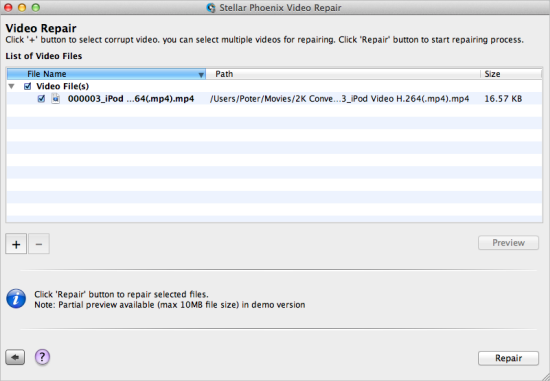
- Step 1: Selecting the repair video tool for Windows or Mac is step one of this instruction manual. Hit the ‘Repair Video’ button to get it done. Step 2: Adding or removing the damaged video files like MOV, MP4, AVI, MKV, WMV, M4V, MXF, MTS, MPG, etc is step two of this instruction manual. Hit the ‘Add’ or ‘Remove’ button to get it done.
- Aug 25, 2021 How to Recover and Repair MP4 Video File on Mac. If you use a Mac computer, then luckily, there is a popular program that can help you recover deleted/lost MP4 videos and repair corrupt MP4 video files both. Stellar Data Recovery for Mac is a professional Mac data recovery program with video repair and photo repair feature.
- Download mp4 video repair for free. General downloads - Recoverit Video Repair for Mac by Wondershare Software Co., Ltd and many more programs are available for instant and free download.
“I just got a GoPro Hero 3 Black Edition and took some great footage. Most files worked great but certain videos get corrupted and won’t play. Is there a way to fix corrupt GoPro Video? Any help would be appreciated.”
GoPro cameras are widely used in extreme action video photography. They are known for its lightweight, durable, waterproof, mountable in unusable places. However, video file corruption issues are quite common in GoPro cameras. Usually, GoPro videos get corrupted due to the following reasons:
– Big video stream can’t be written on the bad quality memory card.
– Physical damage to the camera or abruptly removal of SD card from the camera.
– Camera locks up or freezes due to extreme temperature, improper usage, or sudden power outage.
– Interruption while transferring videos from GoPro camera to computer will lead to video corruption.
– Virus, adware, spyware etc. will affect GoPro video files and result in video corruption.
If you’ve been experiencing GoPro video corruption, here is the right place. This article will introduce free ways to help you repair GoPro video that is corrupted and unplayable.
Jun 18, 2021 VLC can repair videos, but when the file is severely corrupt, you need a repair tool. If you're trying to repair MOV or MP4 videos on Mac, get an MP4 repair tool on your Mac that can fix issues that cannot be fixed by the VLC player. Why is my video corrupted? At times, corruption in video files can be caused by the following reasons: A. How to Recover and Repair MP4 Video File on Mac. If you use a Mac computer, then luckily, there is a popular program that can help you recover deleted/lost MP4 videos and repair corrupt MP4 video files both. Stellar Data Recovery for Mac is a professional Mac data recovery program with video repair and photo repair feature.
Easeus Video Repair
GoPro SOS Function
The GoPro camera has a built-in SOS function that can help to repair GoPro MP4 file. If you think that some of your videos may be damaged, just power on the camera. If you see a picture of a bicycle and a plus sign (+) on your camera’s screen, that’s the file repair icon. This means the camera has found the corrupted videos and will try to fix it. Just press any button on the camera and wait till the camera stops blinking the red color. Once completed, the camera’s screen will revert to the normal file counter display.
Mp4 Repair Mac Free Online
GoPro Video Repair Tool

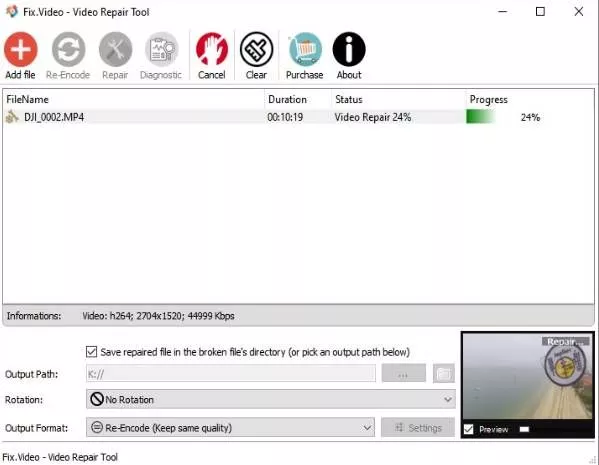
If the SOS function didn’t work for you and the MP4 videos were still corrupted. Don’t worry. There is another solution which helps for GoPro corrupt video repair. MP4 Repair is a utility you can download and run to fix corrupt GoPro video. It is pretty easy to use. Just select one of your videos as a reference and then the corrupt video and run the repair. Normally the utility will only repair half of your videos for free. Fortunately, there is a way to trick the demo version into repairing the full video. The application calculates how much it will repair by file. So, double the file size of the source video and it will repair the whole thing.
Simple tips to prevent video corruption in GoPro camera:

Free Mp4 Repair Software Mac
1. Use a known-good SD card in your GoPro camera, or you may experience video corruption issues. Check out this article to learn the SD card requirements for each GoPro camera.
2. Always make sure your GoPro camera battery is full and is intact. Capturing a video when battery is low might damage your video.
3. Don’t eject the SD card while camera is still processing. Don’t disconnect GoPro camera from computer while transferring files.