- Free Internet Security For Mac
- Sourcetree For Mac Free Download
- Sourcetree For Mac free. download full
- Free Autotune Plugins For Mac
- Sourcetree For Mac free download. software
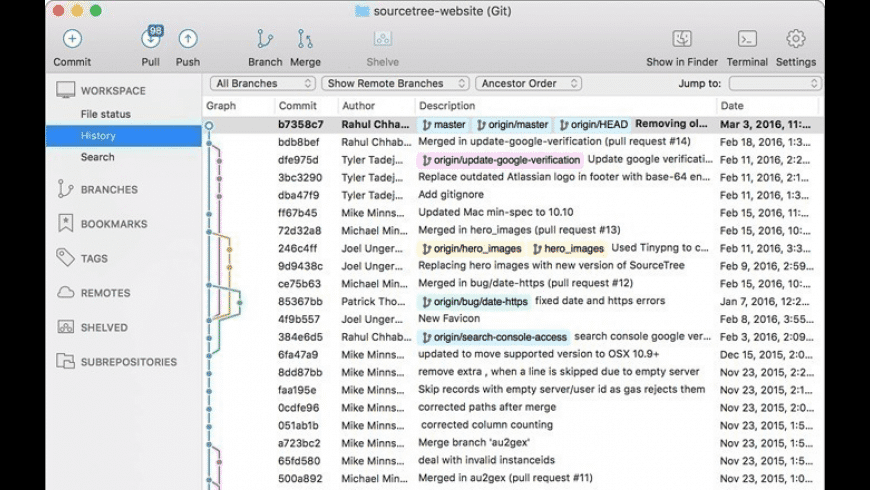
SourceTree 4.0.2 can be downloaded from our software library for free. SourceTree belongs to Development Tools. The most frequent installation filenames for the program include: SourceTree.exe, SourceTree Mac.exe and SourceTreeUpdate.exe etc. The actual developer of the free software is Atlassian. The latest setup file that can be downloaded is. Download Latest Version for Mac (77.74 MB) Advertisement. Mercurial and Git are two of the most popular revision control and code management tools solutions available. SourceTree for Mac has been designed to provide easier access to Mercurial or Git repositories via a well organized, crisp looking graphical user interface.
SourceTree 3.0.17
SourceTree is a fast and easy way to work with Git and Mercurial. Easily utilise both distributed version control systems from one application. Work with your GitHub, Bitbucket, and Kiln accounts without leaving the application. Also works with Subversion servers too! Atlassian has acquired SourceTree, and it is now free for a limited time!Note: Requires .NET Framework.
Also Available: Download SourceTree for Mac
Download SourceTree 3.0.17
Information
Filesize: (23.6 MB) Safe & Secure
Latest Version: SourceTree 3.3.8
Requirements: Windows 7 / Windows 8 / Windows 10
Download from Author Site:
Click to download
Author / Product: Atlassian / SourceTree
Old Versions: Here
Filename: SourceTreeSetup-3.0.17.exe
Windows 7 – Windows 8 – Windows 10 – Windows xp – This software is for windows
Top Contents
You may also like !
Free Internet Security For Mac
Version: 3.3.09 Filesize: 24.1MB
- Freeware
- In English
- Scanned
- 3.71
- (7.99 K Downloads)
Are you someone who has to code a lot for your work or hobby? Do you have to do a lot of software or game development? Are you looking for software that helps you in working with Git or Mercurial? Well then, look no further, as SourceTree is the perfect software for you to use.
Sourcetree For Mac Free Download
What is SourceTree?
SourceTree is a freeware software, meaning it is free to use and download, but the source code for SourceTree is not available for the user to view. SourceTree was developed and published by the company Atlassian. SourceTree allows the user to work with code in Git and Mercurial with incredible speed and performance. SourceTree is perfect for both beginners and experts as it balances ease of use with functionality with its well designed and intuitive user interface. SourceTree was well received on its release by both the critics and the public and was praised for its advanced features.
SourceTree System Requirements
- SourceTree runs on devices running Windows 7 or higher.
- A 1-GHz or higher processor is necessary for running SourceTree.
- At least 512 MB of RAM is required to run SourceTree.
- .NET framework is also necessary for running SourceTree.
- At least 50 MB of free storage space is necessary for installing and running SourceTree.
Main Features of SourceTree
- Ease of use and User Interface (U.I.) – SourceTree is perfect for both beginners and experts as it balances ease of use with functionality with its well designed and intuitive user interface.
- DVCS – SourceTree has an incredibly powered DVCS, which helps the user in coding and software development.
- Advanced Features – SourceTree comes jam-packed with a wide variety of advanced features like patch handling, changesets and branches that are designed to help experts maximize their productivity.
- Git and Hg-Flow – SourceTree has a Git and Hg-Flow feature which helps you in keeping your repositories clean and helps you become more efficient in software development.
How to use SourceTree?
After downloading the SourceTree app, click on the SourceTree app icon to open the app. On the top of the SourceTree interface is a toolbar with the File, Edit, View, Repository, Actions, Tools, and Help options. Below it are the SourceTree features with all of their icons. On the left side of the SourceTree interface is the SourceTree file menu. The central part of the SourceTree interface is the SourceTree work area, whilst the bottom part shows you certain code.
How to get SourceTree?
You can get the SourceTree app by following the steps given below -
- Click on the download button to start installing the SourceTree app.
- Download and open the SourceTree app installer.
- Read the SourceTree ToS (Terms of Service) and agree to it.
- Read the SourceTree License agreement and click on agree.
- Select the destination folder for SourceTree and wait for it to install.
- You can now use the SourceTree app anytime you want.
Pros
- Easy to use.
- Well-designed user interface.
- Lots of advanced features.
App Name: SourceTree
License: Freeware
OS: Windows 7 / Windows 8 / Windows 10
Latest Version: V3.3.09
Sourcetree For Mac free. download full
Latest Update: 2020-12-31
Developer: Atlassian
Free Autotune Plugins For Mac
User Rating: 3.71
Sourcetree For Mac free download. software
Category: Developer Tools