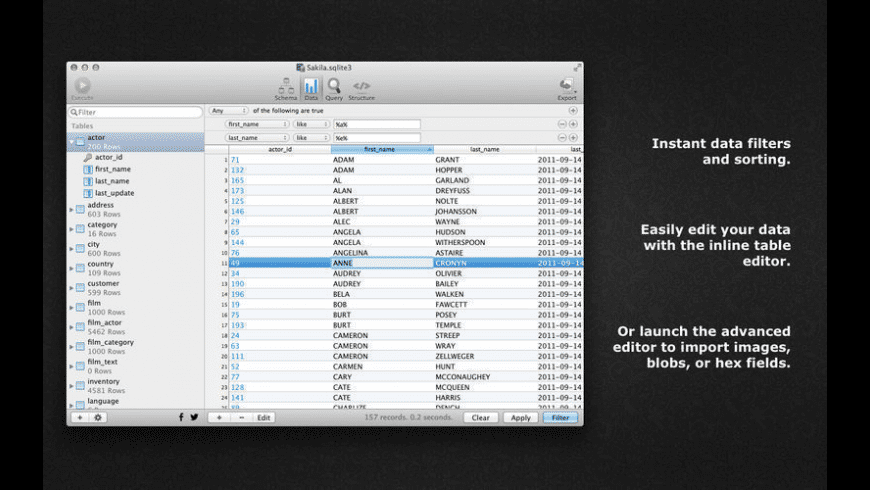
Free SQLite Manager for Mac OS Sqlite-manager is a tool that originated as a Mozilla (Thunderbird, Lightening, FireFox) plug-in for managing SQLite databases. However, over at the Kiveo website blog, I found instructions for making this plug-in a stand-alone application. The inline filters. Free download SQLite Studio SQLite Studio for Mac OS X 👍. SQLite Studio 🛠 is an IDE for software developers that use SQLite, the free, open-source, single-user database engine that is used by a wide variety of software. SQLite Manager Pro for Mac. Found 2 file extension associations related to SQLite Manager Pro for Mac. There are more than 10 alternatives to SQLite Manager for a variety of platforms, including Windows, Mac, Linux, BSD and PortableApps.com. The best alternative is DB Browser for SQLite, which is both free and Open Source. Other great apps like SQLite Manager are SQLiteStudio (Free, Open Source), Valentina Studio (Freemium), Tableplus (Paid).
If you are looking for an SQLite Editor in the public domain under Creative Commons license or GPL (General Public License) i.e. for free commercial or non-commercial use. Then here is a shortlist of the SQLite Editor that is available on the web for free download.
These software work on macOS, Windows, Linux and most of the Unix Operating systems.
1. SQLiteStudio
Link : http://sqlitestudio.pl/
SQLiteStudio Database manager has the following features :
- A small single executable Binary file, so there is need to install or uninstall.
- Open source and free - Released under GPLv2 licence.
- Good UI with SQLite3 and SQLite2 features.
- Supports Windows 9x/2k/XP/2003/Vista/7, Linux, MacOS X, Solaris, FreeBSD and other Unix Systems.
- Language support : English, Polish, Spanish, German, Russian, Japanese, Italian, Dutch, Chinese,
- Exporting Options : SQL statements, CSV, HTML, XML, PDF, JSON, dBase
- Importing Options : CSV, dBase, custom text files, regular expressions
- UTF-8 support
2. Sqlite Expert
Link : http://www.sqliteexpert.com/download.html
SQLite Expert though not under public domain, but its free for commercial use and is available in two flavours.
a. Personal Edition
- It is free for personal and commercial use but, covers only basic SQLite features.
- But its a freeware and does not have an expiration date.
b. Professional Edition
- It is for $59 (onetime fee, with free lifetime updates )
- It covers In-depth SQLite features.
- But its a freeware and does not have an expiration date.

Features :
- Visual SQL Query Builder : with auto formatting, sql parsing, analysis and syntax highlighting features.
- Powerful restructure capabilities : Restructure any complex table without losing data.
- Import and Export data : CSV files, SQL script or SQLite. Export data to Excel via clipboard.
- Data editing : using powerful in-place editors
- Image editor : JPEG, PNG, BMP, GIF and ICO image formats.
- Full Unicode Support.
- Support for encrypted databases.
- Lua and Pascal scripting support.
3. Database Browser for SQLite
Link : http://sqlitebrowser.org/
- Database Browser for SQLite is a high quality, visual, open source tool to create, design, and edit database files compatible with SQLite.
- Database Browser for SQLite is bi-licensed under the Mozilla Public License Version 2, as well as the GNU General Public License Version 3 or later.
- You can modify or redistribute it under the conditions of these licenses.
Features :
- You can Create, define, modify and delete tables
- You can Create, define and delete indexes
- You can Browse, edit, add and delete records
- You can Search records
- You can Import and export records as
- You can Import and export tables from/to text, CSV, SQL dump files
- You can Issue SQL queries and inspect the results
- You can See Log of all SQL commands issued by the application
4. SQLite Manager for Firefox Browser
Link : https://addons.mozilla.org/en-US/firefox/addon/sqlite-manager/This is an addon plugin for Firefox Browser,
Features :
- Manage any SQLite database on your computer.
- An intuitive hierarchical tree showing database objects.
- Helpful dialogs to manage tables, indexes, views and triggers.
- You can browse and search the tables, as well as add, edit, delete and duplicate the records.
- Facility to execute any sql query.
- The views can be searched too.
- A dropdown menu helps with the SQL syntax thus making writing SQL easier.
- Easy access to common operations through menu, toolbars, buttons and context-menu.
- Export tables/views/database in csv/xml/sql format. Import from csv/xml/sql (both UTF-8 and UTF-16).
- Possible to execute multiple sql statements in Execute tab.
- You can save the queries.
- Support for ADS on Windows
- [Solved] Mic not working on iPhone 7 after iOS 14 upgrade - Apple
- ASCII to HEX and HEX to ASCII Conversion Notepad++ - NotepadPlusPlus
- Changed AD user display name showing old name in SharePoint - SharePoint
- Find and Replace Multiple different words with the same word in a text file - NotepadPlusPlus
- Adding Sub Headings to Bootstrap Header tags - Html
Goodbye SQLite Manager…
Late last year, I discovered that my favorite SQLite GUI was defunct. The SQLite Manager was a plugin for Firefox that allowed you to create and interact with SQLite databases with a simple yet highly functional interface. It had good support for importing and exporting csv files, color coding of cells based on data types, and a convenient feature for cycling back and forth between your SQL statements. Since it was a Firefox plugin it was guaranteed to work on any operating system, and since Firefox is installed on machines across my campus I knew I could rely on it for creating data extracts for students and faculty – I’d package data up in SQLite and send it to them along with a link to the plugin.
Firefox goes through about a million versions a year these days, and after a major upgrade last fall (to Firefox Quantum) most of the existing plugins, including the SQLite Manager, were no longer compatible. An upgrade it highly unlikely, as a few things changed under the hood of Firefox that makes the plugin unusable. While it still works on the Firefox Extended Support Release, in the long run the writing is on the wall.
Hello DB Browser for SQLite!
After searching through many alternatives I discovered the DB Browser for SQLite. It runs on Windows, Mac, and Linux and there’s a version for mobile. It was easy to install and has a clean interface. It provides a number of convenient tools and menus that you can use in place of writing SQL DDL, and in some cases it expands the functionality of SQLite by enabling a number of ALTER TABLE commands that are not part of SQLite SQL (like renaming and dropping columns). The Browse Data window makes it easy to quickly thumb through, sort, and filter records and to edit individual values by hand. The Execute SQL window has auto-complete and color-coded syntax, and you can see the database schema in one tab as you write your SQL in another (making it easy to reference table and column names). You can import and export data as CSV (or any delimited text file) or SQL files, and you can save the results of SELECT queries as CSV.
One interesting addition is that there’s actually a Save (Write Changes) and Undo button. So when you create, modify, or drop records, columns, or tables you see the result, but the act isn’t final until you commit the changes. A nice safety feature, especially for db novices.
Execute SQL and View DB Schema
I encountered a few quirks, but nothing insurmountable. I was using the nightly build version without realizing it, and when importing a CSV file the database takes a best guess as to what the data types for the columns should be. Even though the import screen gives you the option to specify that values are quoted, my quoted numeric fields were still saved as numbers and not text. As a result, ID codes like FIPS or ZIP Codes lose their leading zeros and are saved as integers.
The project is managed on github, so I went ahead and posted an issue. The developers were super responsive, and a discussion ensued over whether this behavior was desirable or not. We found two work-arounds. First, if you build an empty table with the desired structure, and then go to import the CSV, if you provide the name of that empty table as the new table name the db will import your data into that table. Alternatively, if I went and downloaded the latest stable release (3.10.1) the default behavior is that all columns are imported as text, which is a safer bet. You can use the GUI to change the types after import. The issue was marked as a bug, and will be addressed in a future release – one possible solution is to provide an option to turn the autodetect feature on (to determine what the types should be) or off (to import everything as text).
The browser also has a feature to attach a database to the current database, but when you do the attachment it appears like nothing happened – you can’t see or browse the objects in database number two. But it IS attached (you can see every statement that’s been executed in a helpful log window) and you can copy a table from one db to the other like this:
You run this within the current database, and database2 is the attached database (when you attach a db you provide an alias for referencing it).
Sqlitestudio Mac
These are minor quibbles. The DB Browser for SQLite is cross-platform, stable, has a clean interface with nice features, and is actively developed by a responsive and friendly team. I’ll be using it for all my SQLite tasks and projects, and will recommend it to others.
Spatialite?
An alternative I considered was to simply use the Spatialite GUI for both regular and spatial databases. It also has a simple, solid, and functional interface and supports spatial SQL, giving you the best of both worlds. So why not? While it works great for my own purposes it’s not something I can recommend to new users who are not GIS folks, either in my work or in the census data book I’m writing. Just figuring out where to download it from the website is overly complex, and while there are binaries for MS Windows there are none for Mac users. You’d have to install it from the source files, which is over the top for novices. Linux users may get lucky and find it in their software repos (it’s included for Debian and Ubuntu). The database browser in QGIS has matured in recent years, so that’s another option for GIS users who want to work with Spatialite or PostGIS.
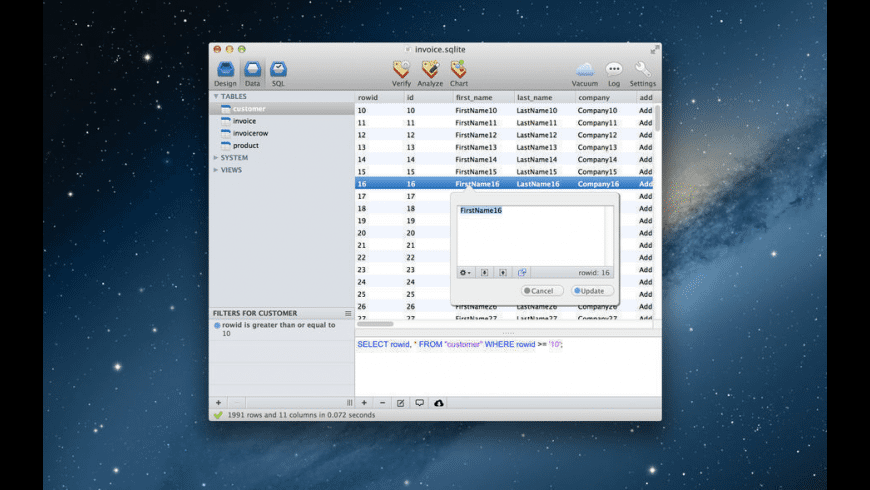
Sqlite Database Manager
Now if we only had a good GUI for PostgreSQL… I tried pgAdmin 4 about a year ago, and it was so bad that I’m still clinging to pgAdmin III as long as it still lives. But this is a different story, and one I’ll return to and investigate fully when it comes time to teach my spatial database course next year.