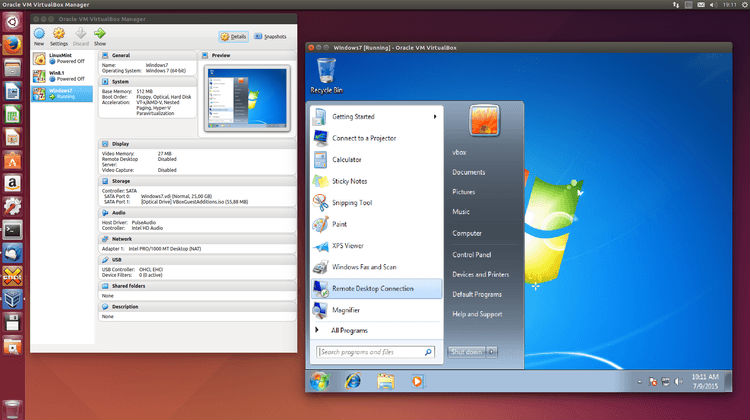
Step 2: In the Create Virtual Machine dialog box, type ' Windows 10 ' and then click the “ Version ” and select which type it is from a couple of drop-down menus (making sure to match the ISO you downloaded: 64- or 32-bit). Then click “ Next ” button. Step 3: Decide how much RAM you want to allocate for this VM. Jun 27, 2020 Download & install the latest offline installer version of Oracle VM VirtualBox for Windows PC / laptop. It works with both 32-bit & 64-bit versions of Windows XP / Vista / Windows 7 / Windows 8 / Windows 10. Free & Safe Download for Windows PC/laptop – 108 MB. Safety (Virus) Test. In this video, I showed you how to download VirtualBox software 64 bit or 32 bit. You can download this VirtualBox software on Windows, Mac, and Linux OS as. To install a 64-bit version of Windows, you need a CPU that's capable of running a 64-bit version of Windows. The benefits of using a 64-bit operating system are most apparent when you have a large amount of random access memory (RAM) installed on your computer, typically 4 GB of RAM or more.
| Reported by: | Owned by: | ||
|---|---|---|---|
| Component: | other | Version: | VirtualBox 5.2.22 |
| Keywords: | Cc: | ||
| Guest type: | all | Host type: | all |
Description
Attachments
- VirtualBox_2018-11-27_21-27-08.jpg (88.7 KB) - added by jesusemarquezz3 years ago.
- mmc_2018-11-27_21-31-56.jpg (133.5 KB) - added by jesusemarquezz3 years ago.
- cpuz_2018-11-27_21-42-20.jpg (66.4 KB) - added by jesusemarquezz3 years ago.
- explorer_2018-11-27_21-43-37.jpg (74.4 KB) - added by jesusemarquezz3 years ago.
- Taskmgr_2018-11-27_21-45-02.jpg (72.6 KB) - added by jesusemarquezz3 years ago.
Change History
Changed 3 years ago by jesusemarquezz
- attachmentVirtualBox_2018-11-27_21-27-08.jpg added

Changed 3 years ago by jesusemarquezz
- attachmentmmc_2018-11-27_21-31-56.jpg added
Changed 3 years ago by jesusemarquezz
- attachmentcpuz_2018-11-27_21-42-20.jpg added
Changed 3 years ago by jesusemarquezz
- attachmentexplorer_2018-11-27_21-43-37.jpg added
Changed 3 years ago by jesusemarquezz
- attachmentTaskmgr_2018-11-27_21-45-02.jpg added
 longer with the virtual machine, as do several other I/O intensive 32-bit programs.
I've tried to speed it up as follows:
• Increasing 'base memory' from 1024MB to 3584Mb didn’t help. More than that (with 128MB video memory) prevents the virtual machine from loading. But 1024MB works fine with a W10 (332-bit) or Linux Mint (64-bit) host.
• Enabling I/O APIC didn't help
• Can’t select multiple processors (option is greyed out on x64 host, but not on x32 or Linux host!)
• Can’t enable VT-x/AMD-V (Acceleration tab is greyed out on x64 host, but not on x32 or Linux host, which do have it selected!)
• Can’t enable Nested Paging (Acceleration tab is greyed out on x64 host, but not on x32 or Linux host, which do have it selected!)
• Increasing the display memory to 128MB didn’t help
• Enabling 3D Acceleration and/or 2D Video Acceleration didn't help
• Unchecking 'Use Host I/O cache' made no difference
• Checking 'Solid-state drive' made no difference, even though the .VDI file is stored on a SSD
• Excluding c:VirtualMachines from Defender scan didn’t help, nor did disabling Avira in the VM
• Turning off indexing (in the virtual machine) didn’t help
• Defragmenting the virtual hard disk (in the virtual machine) didn't help
• Changing the power plan (in the host machine) to 'high-performance' didn't help
Any other suggestions?
Virtual 32 Bit Windows 10
(Note that this does not happen with VirtualBox 5.2.32 on a Windows 10 32-bit system, or VirtualBox 5.2.32 on a Linux Mint 64-bitWindows 10 32-bit Download
system with the identical
 Windows XP VM, but the same anomaly
Virtual Machine For Windows 10
does occur with VirtualBox 6.0.10 on a Windows 10 64-bit system!)SOLVED 08/11/2019: After reading viewtopic.php?f=1&t=62339, and following those suggestions, I discovered that Virtualization was not enabled in the BIOS of my new motherboard. Enabling it solved the problem. Many thanks to Mpack and Socrates.