Powerful and useful software application that enables you to quickly record the Skype2Skype / SkypeOut / SkypeIn / Skype Conference calls you want
Skype is no longer an app that is used solely to connect people with family and friends when they travel abroad, as more and more companies rely on it for conferences with their partners from other countries. And since it could come in handy to be able to record all the interviews or business conferences, users can try iFree Skype Recorder.
License:Freeware (Free) File Size:2.14 Mb. Runs on: Windows 7, Windows 7 x64, WinServer, Win Vista, Win Vista x64, WinXP. Supertintin Msn/Live Messenger Webcam Recorder v.1.1.0.0731. Supertintin is a recorder for skype. It records both audio and video in all kinds of skype calls and voice mails. Free, open source, cross-platform audio software. Audacity is an easy-to-use, multi-track audio editor and recorder for Windows, Mac OS X, GNU/Linux and other operating systems. Developed by a group of volunteers as open source and offered free of charge. Amazing support community. IFree Skype Recorder 8.0.26. Add to watchlist send us an update. 7 screenshots: runs on: Windows 10 32/64 bit. Windows 8 32/64 bit. Windows 7 32/64 bit.
- Adds support for Mac OS 10.11 'El Capitan' Compare source changes Version 0.1.4.2015-08-28T18:30:44Z published 8/28/2015, 11:31:56 AM from f34367 Download.
- MSN Webcam Recorder (Freeware/Windows) is a free software that allows you to capture/save/ record video streamed to and from your computer by MSN Messenger's Web Cam Feature. It doesn't do screen capture like other software programs, that are innacurate, skip some frames, and lose in quality.
The application installs without any issues and you will only need to authorize it within Skype. Once this step has been completed, whenever you start a new call, iFree Skype Recorder will automatically capture it and save it as an MP3 stream to the folder you choose. You can also specify if you want the app to record both sides of the call, only your side or only the remote one.
Furthermore, if you are a tech-savvy user, you can also adjust the recording mode (mono, stereo or joint stereo), as well as the bitrate and samplerate.
The interface of the application is kept as simple and as intuitive as possible, so as to be of use to novices, as well as experts. In addition, to make sure it does not disturb you during Skype calls, you can set the utility to automatically minimize to the system tray when it is run.
You can also use iFree Skype Recorder as an answering machine that sends a customized message whenever your status message is set to Away, Busy or Do not disturb.
To wrap it up, iFree Skype Recorder can help you make the most of your Skype calls as it provides you with the possibility to save them for later analysis. On the other hand, the captured calls are in audio format, so if you are interested in video recording, you will need to look for another software solution.
Filed under
Download Hubs
iFree Skype Recorder is part of these download collections: Skype Recorder
iFree Skype Recorder was reviewed by Giorgiana Arghire- Recording all audio sound from PC
iFree Skype Recorder 8.0.26
add to watchlistsend us an update- runs on:
- Windows 10 32/64 bit
Windows 8 32/64 bit
Windows 7 32/64 bit - file size:
- 8.3 MB
- filename:
- iFreeRecorder.exe
- main category:
- Multimedia
- developer:
- visit homepage
top alternatives FREE
top alternatives PAID
You can use this simple and efficient software solution to record an MSN chatmate's webcam video or capture the full MSN conversation
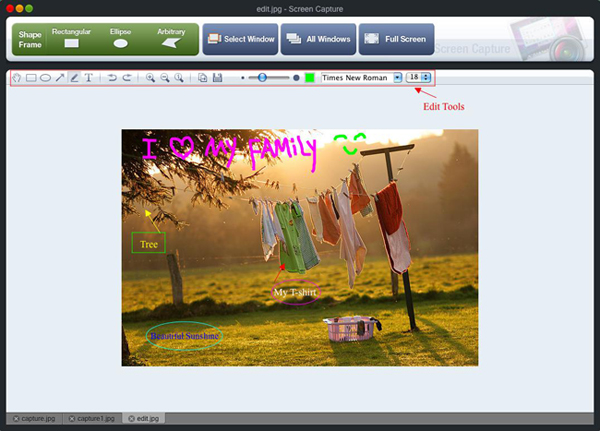
MSN Recorder Max is a user-friendly and efficient application whose main purpose is to provide you with the ability of recording your conversations on MSN, saving them to your computer, with the least amount of effort.
After installing the tool, you can launch it and begin working with it, as it features a straight-forward interface that makes it quite approachable, even for those who have no experience in working with similar software.
In order to begin recording a conversation on MSN, first you need to open the chat window. You can then click the 'Record' button in MSN Recorder Max and choose which conversation to capture. At the same time, you also have the possibility of targeting your 'Full Screen', a 'Selected Window' or a 'Selected Region'.
Subsequently, you can enter the output file name and the save location. By pressing on 'Advance', you can choose the preferred 'Video Format' (AVI, MP2, MPG, MP4, 3GP or FLV), along with the audio parameters in case you also wish to capture sound. Finally, you can press the 'Record' button and MSN Recorder Max will start the operation.
A small, preview window within the application allows you to view what is being recorded, along with the duration of the movie. When you finish the conversation, you can click on the 'Stop' button, which will offer you the possibility of uploading the video to YouTube, but you will need to enter your account credentials and other details.
Additional features of MSN Recorder Max include the ability to apply a time stamp onto your conversation, display a text in the background or enable text shadow, choosing the preferred color for each one.
To summarize, MSN Recorder Max proves to be a handy and reliable piece of software by means of which you can easily capture every important conversation you have through the MSN chat.
Filed under
 MSN Recorder Max was reviewed by Giorgiana Arghire
Free Msn Recorder Mac
LIMITATIONS IN THE UNREGISTERED VERSION- 30 day trial
- Watermark
- Compatible with Windows Live Messenger 2009
MSN Recorder Max 4.4.8.2
add to watchlistsend us an update- runs on:
- Windows 2003
Windows 7 32/64 bit
Windows Vista 32/64 bit
Windows XP
Windows 2K - file size:
- 2.9 MB
- filename:
- MSNRecorderMax-4.4.8.2.Setup.exe
- main category:
- Internet
- developer:
Free Msn Recorder Mac Free
top alternatives FREE
top alternatives PAID