Fast Nintendo 64 emulator that uses a very efficient plugin system and contains advanced settings which cater to experienced users
Nemu64 is a lightweight and portable software application which enables you to emulate Nintendo 64 games in order to play them on the computer. It features several advanced settings that should meet the requirements of most users.
No installation necessary
Just Download, Run Setup, And Install. Euphoria Game Overview. Euphoria Game Download can be accessed through torrent GOG link provided for Mac/windows Game. Are you trying to download the Euphoria Game to free download in full version? Then you are going on the right path to get it. Apr 30, 2021 Hence, you can play with family members at home or remotely with friends. Lastly, it has a full joystick and gamepad support in case you want a more flexible playing experience. Unfortunately, it’s only available on Windows — tough luck for Mac and Linux users. Download Nemu 64. Download Nemu64 0.8 from our website for free. The program's installer files are commonly found as NEMU.EXE or nemu64.exe etc. This free software is an intellectual property of Lemmy and LaC. The most popular version among Nemu64 users is 0.8. Nemu64 is included in Games. Downloads: 344,320. User rating: 424 votes. Rate this 5 (Best) 4 3 2 1 (Worst) MEmu App Player aims to provide you with the best experience to play Android games and use apps on Windows. Nemu Installer 1.9.11. May 16, 2020 05/20. The file ending 32bit is a Linux binary, i386 is a Mac binary and 20150125.7z is a Windows binary.
Since there is no setup pack involved, you can copy the program files to any part of the hard disk and just click the executable to launch Nemu64. Another option is to save the tool to a USB flash disk or other removable storage unit, in order to run it on any PC effortlessly and without previously installing anything.
An important factor worth keeping in mind is that the program does not add new entries to the Windows registry or Start menu, so no traces are left behind after its removal.
Classical-looking interface with advanced options
The GUI consists of a normal window with a plain and simple structure, where you can load Rom and Zip files via the file browser or drag-and-drop method. It is possible to start a Nemu movie recording, save the emulator's current state and load it at a later time, as well as to pause and reset it.
You can also change the resolution, view any errors, start a Netplay session, and resort to various plugins to enhance Nemu64's functionality, such as those related to commands, memory, registers, bookmarks, statistics, and so on. Audio, video and input plugins can be configured. These are just some of the options available in this software tool.
Evaluation and conclusion
The tool does not put a strain on PC performance, since it runs on low CPU and memory. It has a good response time and did not hang, crash or pop up error messages in our tests. We must keep in mind that it has not been updated for a long time.
Filed under
Nemu64 was reviewed by Elena OprisNemu64 0.8
add to watchlistsend us an update- runs on:
- Windows All
- file size:
- 4.7 MB
- filename:
- nemu08.zip
- main category:
- Others
- developer:
top alternatives FREE
top alternatives PAID
MuMu app player is a free android marshmallow emulator for Mac OS or Windows OS developed by NETEASE. MuMu app player is also known as NemuBox or Nemu Launcher. Currently, MuMu App Player is the only Android Marshmallow available and can run on Windows 10.
MuMu app player is not like RemixOS, where RemixOS is an android marshmallow that runs on x86 processors and is not an android emulator that runs on Windows 10 OS or iOS.
MuMu is an official android emulator developed by NETEASE which is intended to play games made by NETEASE or 163.com. But don’t worry, MuMu App Player can play almost all Android games and applications on the Play Store.
MuMu App Player System Requirements
MuMu App player is a very light android emulator so running it doesn’t need very high PC specifications. The following are the system requirements needed for MuMu to run.
Minimum System Requirement
- Processor: x86/x86_64 Processor (Intel or AMD CPU)
- Operating System: Windows 7 / Windows 8 / Windows 10
- Graphic: Graphic driver with OpenGL 2.0
- Virtualization Technology: Intel VT-x / AMD-V enabled from Bios
- RAM: 2GB
- Storage: minimum 2GB free storage
Recommended System Requirement

- Processor: x86/x86_64 Processor (Intel or AMD CPU)
- Operating System: Windows 7 / Windows 8 / Windows 10
- Graphic: AMD Radeon / NVidia Graphic
- Virtualization Technology: Intel VT-x / AMD-V enabled from Bios
- RAM: 4GB
- Storage: 10 GB of free storage
How To Download MuMu App Player
To download the MuMu App Player installer file, you can get it directly on the official MuMu App Play website. Don’t forget to download the global version of MuMu which supports English. The MuMu installer file is only approximately 7MB. Unfortunately, they don’t provide the MuMu App Player offline installer.
Nemu Installer Mac Download
How To Install MuMu App Player
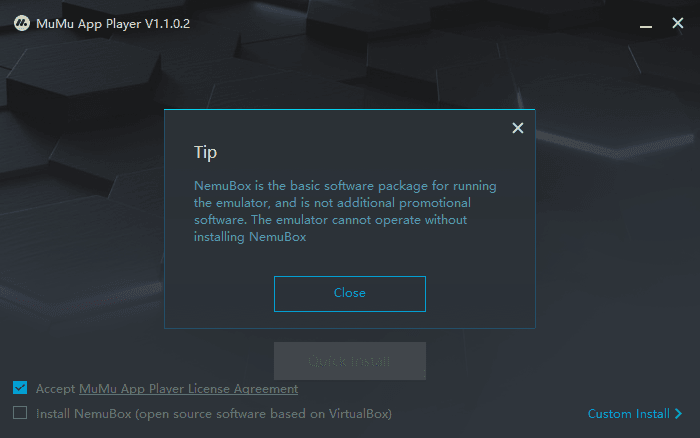
The MuMu Player installation process is very easy, just open the MuMu Installer that we downloaded earlier and follow the instructions. To be able to install MuMu Player you must be connected to the internet because the MuMu installer will download a file of approximately 500MB.
- Accept MuMu App Player License Agreement & Install NemuBox. Press Quick Install if you don’t want to customize your MuMu Player installation or Custom Install if you want to move your MuMu Player installation.
- Installation progress will start. There are 4 steps, Download VBox, Download MuMu, Install VBox, Install MuMu.
- Installation Completed
MuMu Player Keyboard and Mouse Settings (ALT+1)
Every Android emulator has its own keymapping which you can customize with your favorite games. So, if you are not comfortable with the default keymapping/keyboard and mouse settings, you can change them at any time. The MuMu player is simpler than other android emulators such as NOX and GameLoop.
Memu Installer Mac
- Click
Drag it to the location that needs to be clicked and assign keys to replace clicks. - Directions
Drag the game direction wheel to control character movement, often controlled by the WASD keys on the keyboard. - Fire
Special shooting game, drag to shoot button and click left button to shoot. Requires use with a destination button. - Aim
Special shooting games, drag into the game to realize camera rotation and aim, usually placed in an empty space on the left side of the game. Often use the ~ button to open LB aim / shot mode. - Gravity
Drag into the game to set the key to control the gravity sensor. - Smart cast
Often used for skill buttons in Arena of Valor and other MOBA games, press and hold the button to move the cursor and select the direction and target cast. - Running RB
Similar to the League of Legends operation, drag the wheel to the game direction and right-click to control the movement of the character. - Camera
Drag into the game to set the key to control the 360-degree camera rotation, which is often used in 3D games.
Can we play Pokemon GO in MuMu App Player
This is what makes MuMu special, MuMu is very stable to play Pokemon GO on PC. We have tested several android emulators such as LD Player, Nox App Player, MeMu App Play, and Bluestacks. MuMu is the one who has never experienced errors or crashes when playing Pokemon GO. This is what makes MuMu App player the best emulator to play Pokemon Go on PC.
How To Play Pokemon Go on PC Using MuMu?
To be able to play Pokemon Go on PC using MuMu, we must download the latest PGSharp. Please note that the official Pokemon Go app cannot be used to play Pokemon Go on PC using any android emulator.
Follow the steps below to install PGSharp on MuMu.
Nemu Installer Mac Os
- Download Latest PGSharp APK.
- Run MuMu Play.
- Press APK button on the bottom menu.
- Select the PGSharp APK that we downloaded earlier
- Wait until the PGSharp installation process is complete
- Open PGSharp app or Pokemon GO app
- Tap the floating Yellow Star icon.
- Tap gear icon
- Tap Activate account and input your PGSharp code there and hit OK.
| PGSharp Free Key | Date Created |
|---|---|
| 92FC*CCC 93B9E*0E 662AB*0B 1E0FF*11 7C1CE*57 D73A*75F B1A*4E75 D5*AB068 5D7*8B1B 83A*390E | 21-12-2020 21-12-2020 21-12-2020 21-12-2020 21-12-2020 21-12-2020 21-12-2020 21-12-2020 21-12-2020 21-12-2020 |
Please note that PGSharp only supports login using the Pokemon Trainer Club account and does not support logins using Google and Facebook.
Below is a tutorial to play Pokemon GO on PC using MuMu App Play in the video version
How to create a Pokemon Trainer Club account
- Open your favorite internet browser and navigate to register pokemon trainer club account.
- Enter all the required fields. Please note that to fill in the password, make sure you use a combination of Uppercase, Lowercase, letters, numbers, and special characters (this is mandatory). Don’t forget to accept Pokémon Website Terms of Use
Below is a tutorial to play Pokemon GO on PC using MuMu App Play in the video version