Andy OS for Mac, free and safe download. Andy OS latest version: Experience the magic of Android on your Mac! Want to run Android on a Mac?
- Andyroid.net: Andy is the best Android emulator available. Andy provides an easy way to download and install Android apps and games for your Windows PC or Mac.
- Today we bring the guide to you which will tell you How to Run Android Apps on Mac OS X with Andy Emulator.
Compared to the more famous BlueStacks Android emulator, Andy offers a more wholesome experience by granting access to a full-featured OS installation that is both familiar (the app’s main window resembles the screen of your Android tablet or mobile phone) and customizable.
Andy does not emulate only the Android OS, but the entire environment: the device’s primary control buttons are included, and you can switch between portrait and landscape mode. In theory, Andy’s Virtualbox virtual machine should be able to use your Mac’s microphone and camera, but we did not manage to establish a connection.
Initially, you will setup the VM like any other Android tablet or phone, and you can use the GooglePlay store to download and install applications or games. Even though Andy should work with any Android app, on the developer’s website you can see a list of tested utilities.
Easy-to-setup Android emulator that runs on a Linux VM hosted by VirtualBox
Like with any other VirtualBox image, you can improve Andy’s performance by increasing the available RAM memory and CPU power. Make sure to read the developer’s directions before making any adjustments.Noteworthy is that most of the already limited support documentation has been written with Windows users in mind, so some of the indications are not applicable for OS X users.

This is obvious when trying to use the shared folders to transfer files between your computer and the Andy VM: you can perform the task, but you need to use the “/Library/Application Support/Andy/andy/resources” folder, which is not mentioned in the FAQ.

The developers provide documents that are covering essential aspects concerning the app installation and optimization, but there is no extensive help file. However, if you encounter any issues, you are encouraged to post on the support Facebook group.
Control the Android emulator with your mouse and keyboard or by using the remote control companion app
Andy allows you to use your mouse and keyboard to navigate its interface seamlessly, but the developers also provide a companion remote control application for Android devices. The free companion mobile utility can connect to any Andy installation detected on your network (if you are having issues with the automatic detection, you can use the IP address directly).Your Mac’s peripherals prove useful when you have to navigate through menus and windows while the remote controller is needed when playing certain games. Unfortunately, the controller is useless when navigating menus because you cannot see the cursor’s position while the mouse and keyboard cannot interact with some games accurately.
Try out Android apps without investing in a device or play your favorite games on a larger screen
Having Andy installed on your Mac can prove to be beneficial regardless of you being the owner of an Android device or not. If not, you get to experience games and apps that are available only on this operating system, without having to wait for the developer to release iOS or OS X ports.On the other hand, if your tablet or mobile phone cannot handle games that require a high amount of resources, you can use Andy to bypass limitations, to play them on a larger display, and so on.
Andy integrates the 1ClickSync technology that should sync data between your mobile device and the Andy VM, but during our test the feature did not work. As a result, if you want to use the virtual image to access various productivity apps, you have to rely on conventional synchronization methods, which means that you might be better off using OS X companion clients.
The Good

The Bad
As with any virtualization solution, Andy takes a serious chunk out of your Mac’s resources: it needs up to 3GB RAM, and at least 20GB of free disk space. What’s more, on slower Mac models, while running Andy you might experience certain delays when performing tasks within the OS X.Moreover, since the video memory is limited to 128MB, if you are playing games that have high-quality graphics, you might encounter performance issues, especially in full-screen mode.
The Truth
Andy does not limit itself to merely providing support for a collection of popular Android apps. You should be able to install and run any app that can be downloaded from the GooglePlay store, and interact with them like you would do on any Android tablet or mobile device.Bottom line, Andy delivers a familiar workspace and allows you to use your favorite Android applications from the comfort of your Mac’s desktop. Some of the advertised features do no work properly or not at all, but when it comes to deploying random Android apps, everything went quite smoothly.
AndY Android Emulator is a free way to run the Android operating systems on a Windows PC.
With this emulator, you can run all types of Android applications without having to have the handset or tablet PC yourself. That essentially gives you access to all sorts of Android games and apps, including the homescreen you can usually only run on phones.
AndY Android Emulator works with the Oracle virtual machine and it comes with the installation package. This provides for a stable experience without having to worry about crashing or incompatibilities.
Virtually all of the main Android features are available with AndY Android Emulator including support for WhatsApp, push notifications, gaming, modern versions of Android and synchronization with your main Windows PC and the virtual OS that AndY emulates.

Andy Android Mac Os
All in all, AndY Android Emulator is a competent and free Android emulator and virtual machine with gives access to all of the features of Android on your desktop.
AndY Android Emulator can play APK apps and emulate Android.
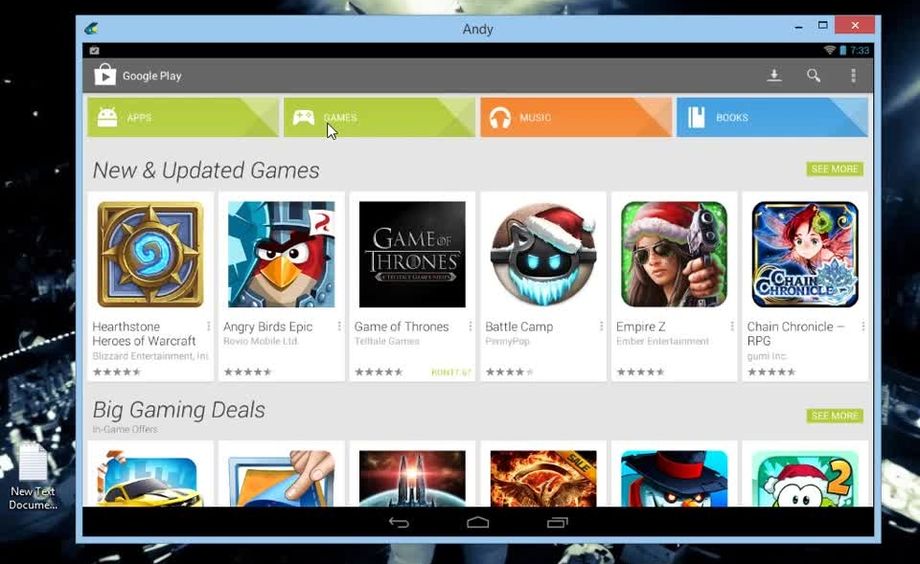
Andy Android Emulator
Features and highlights
- Provides seamless sync between desktop and mobile devices
- Connects Win/Mac with Android apps for launching, push notifications and storage
- Enables app download from any desktop browser direct to Andy OS
- Ensures most up to date Android OS at all times
- Brings your favorite communication and entertainment mobile apps to the desktop
AndY Android Emulator 47.260 on 32-bit and 64-bit PCs
This download is licensed as freeware for the Windows (32-bit and 64-bit) operating system on a laptop or desktop PC from console emulators without restrictions. AndY Android Emulator 47.260 is available to all software users as a free download for Windows.
Filed under:- AndY Android Emulator Download
- Freeware Console Emulators