Did you know that you can now enhance the quality of videos you make from your smartphone thanks to the compatibility of the Apple iMovie for Android devices? Greatopedia talks about it, and so does other reputable sites on the net.
IMovie for Windows. When it comes to creating a movie, every Apple fan might recommend iMovie.With this video editor, you can create Hollywood-style trailers as well as stunning 4K-resolution movies quickly and easily on yuor Mac and iOS devices.
Therefore, If you didn’t know this before today, now you do!
Previously, it was impossible to install this app on Android phones and tablets due to the fact that most apps designed by Apple could only run on iPhones, iPads, and Mac computers which is still the case till today
As a consequence, users of other operating systems like Windows and Android do not benefit from these apps.
The program gives Mac users an easy-to-use yet powerful video maker – and it’s already built into their machine. Unfortunately, Apple developers have not provided a way to download iMovie for Windows 10, Windows 8, Windows 7, or Windows Vista. However, people still search “download iMovie for PC”. It’s available on Mac, Windows, and Linux. There’s also a premium version you can get for $295. This version includes some of the advanced features of the app like its Neural Engine and FX filters. HitFilm Express. HitFilm Express is another free video editing app you can use to edit and produce videos. Final Cut Pro X. Platforms: Windows and Mac. Filmora is a quite popular choice as an app like iMovie. The reason behind its popularity is: Not being technically advanced, and the powerful features that are so easy to use, in other words, the ease of use makes it quite popular among newbie video creators.
But that’s no longer the case since an exception has been made to the iMovie APK editor.
With iMovie for Android, you can trim your videos, add stickers to them, change the soundtrack, and also play your videos directly from the app.
Also, you can even merge several video clips to form one movie or cut the video at the middle to make editions where necessary.
All this is made possible by sites like Getjar and Apk pure who have offered this app for free download on Samsung, Huawei, Infinix, HTC, and other Android phones.
If you’re wondering what iMovie is, then read on.
What is iMovie?
iMovie is a movie player that was first developed in 1999 by Apple Inc.
Since then, we’ve had various versions of the app and you’ll find some like the iMovie HD 6, iMovie 10.0.9, and iMovie 10.1.6.
This app enables you to stream movies in the iMovie theater and even connect wirelessly to your HDTV and according to Lifewire, you can import your videos, pictures, and music to it, to begin editing.
It is compatible on the iPhone 5, 6, 7, and iPod, and has also been made available for Mac devices.
In the same vein, if you do not want the app, you’ll find the extension in the Photos app which can also enable you to modify your videos with ease.
Alternatively, there are several other apps like iMovie for Android which can do the same job as this particular app.
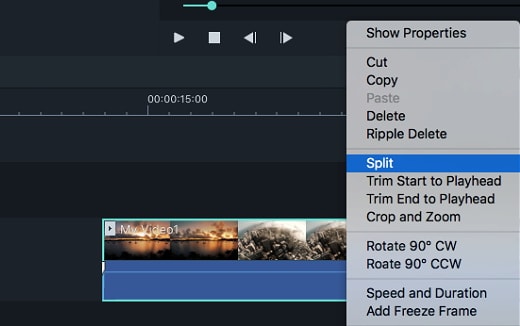
These are apps that are designed by third-party developers and as such, they are open source software that is free for use and sharing.
Apps Like Imovie For Android
Some of these apps include the following:
- Power Editor:
- AndroVid
- VidTrim
While they all have something in common, which is, the ability to run on Android devices, each seeks to enhance the level of performance on the device they are running on.
Accordingly, where one fails, the other makes up for it.
Now let’s take a closer look at these apps that are also similar to iMovie for Android.
1. Power Editor:
Power director video editor is available for Android as well as PC.
With this app, you can enhance the quality of your videos since you can modify the contrast, brightness, and saturation.
2. AndroVid:
AndroVid enables you to extract an image from your videos and even convert a video to Audio file.
This means that you can have either a video, audio or a picture depending on your choice.
3. VidTrim:
Vidtrim is a video trimmer and frame grabber that enables you to create pictures and music from your files.
You also get to cut a video wherever you’ll want it to end, and merge it with another video.
With this app, you can also modify the contrast and brightness of your videos easily.
The best part?
You are not limited to how long your videos can last since you get to decide the maximum length of your videos.
Conclusion:

And that’s all you need to enhance your level of entertainment at home, school, work, or office with just a download of iMovie app for Android on your smartphone.
This application is free and as such, you do not have to worry about a monthly subscription or in-app purchases.
Go ahead and give it a download and see how well it’ll work for you.
Being one of the best professional video editor products, iMovie has managed to capture a lot of loyal users by its ease of use and powerful media processing ability. However, like all of the other applications developed by Apple, iMovie is not liked by everyone for its unique interacting style.
Good thing is, in this highly developed the digital world nowadays, nothing is irreplaceable. If you are not used to using the iMovie as your video editing tool, there are still a lot of iMovie alternatives that you can choose from. And today we are going to introduce some of them.
Part 1: About iMovie
Free Apps Like Imovie For Mac Computers

Initially released in 1999, iMovie has been one of the most popular video editings and creating application on the Mac OS for almost two decades. Within these years, iMovie has successfully evolved from a simple video edition tool to powerful multimedia creating center. With iMovie, you can easily realize your creativities in the form of video, image, photo slideshow and more.
iMovie is available on almost all of Apple’s computer or smartphone devices and is preinstalled on both the Mac OS and the iOS system. If you are using an iPhone or a PC that runs the Mac OS, the purple icon with a start and a filming camera on it is the iMovie app.
iMovie s powerful media processing abilities make the app handy for people in different areas. It doesn’t matter if you are a YouTuber trying to make a stunning YouTube video, or just a home guy who wants to make a beautiful family album, iMovie can make it all happen. However, although iMovie is a good app, it’s far from being a perfect one.
Not only does the unique interacting style of iMovie need some time to get used to, but sometimes you also need to pay for the functions you need despite it’s a pre-installed app on your device. So for those who need an iMovie alternative to replace the app, we have some really good suggestions for you in the following for your reference.
Part 2: 5 Best iMovie Alternatives for Windows
Leawo Video Converter Ultimate
Leawo Video Converter Ultimate is one of the best media processing application on Windows. Not only is the program powerful and multifunctional, it’s also super easy to use and way more user-friendly than iMovie. Like iMovie, Leawo Video Converter Ultimate can easily perform some video editing tasks from trimming video, cropping video to adding watermark to video, converting video formats etc.
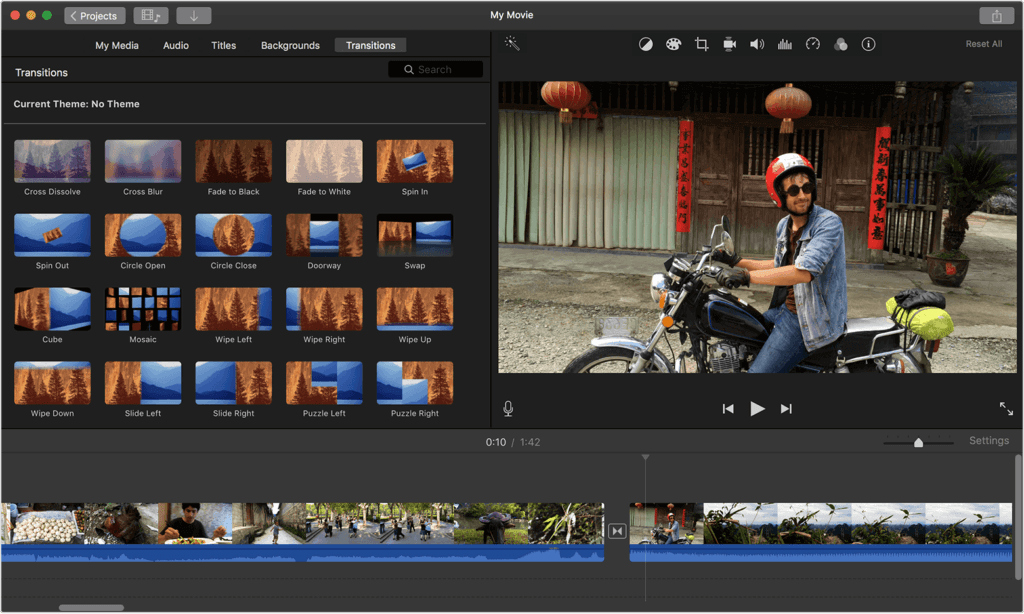
What’s more, Leawo Video Converter Ultimate can also do something that iMovie couldn’t. With Leawo Video Converter, you can easily rip HD videos out of a Blu-ray or DVD disc, download YouTube videos to MP4, burn your own videos to DVD or Blu-ray and do many more advanced multimedia works. If there is one most recommendable iMovie alternative for Windows, then it has to be Leawo Video Converter Ultimate in my opinion.
Adobe Premiere Pro
When it comes to the video production work, Adobe Premiere Pro might be the most professional application that you can possibly have. With tons of powerful media processing functions and uncountable customization options, Adobe Premiere Pro can realize almost any effect you want on your video as long as you know how.
Because of the powerful functions that this product can provide, Adobe Premiere Pro is the first choice for a lot of professionals working in the video production industry. However, the high price and the complicity makes this product not suitable for total beginners.
Pinnacle Studio
Pinnacle Studio is an easy-to-use iMovie alternative for Windows users. If you are overwhelmed by the complicity of iMovie or Adobe Premiere Pro, then Pinnacle Studio might help you out by providing a simple interacting style. Although the program is easy to use, the ability of Pinnacle Studio is still powerful.
Pinnacle Studio offers all of the basic video editing functions plus multi-tract video editing, enhanced color effects panel, multi-camera video editing and many advanced video processing options. The price of Pinnacle Studio starts at $59, which is hardly a bargain, but is also not so overwhelming for beginners.
Sony Vegas Pro 16
Together with iMovie and Adobe Premiere Pro, Sony Vegas Pro is one of the top 3 most popular video producing applications among the video professionals. Sony Vegas Pro 16 has all of the functions that Sony Vegas Pro always have, plus some new features like streamlined editor, hover scrub, extensive file backups, high DPI scaling and more.
Comparing to its counterparts, Sony Vegas Pro 16 provides a detailed audio editing interface, giving you a full control over the audio in your video like no app else. Just as all of its advantages, he disadvantages of Sony Vegas Pro 16 are also obvious. Like its professional counterparts, Sony Vegas Pro 16 is expensive, complicated and need some demanding on computer specs.
Lightworks
As an open-source video editing program, Lightworks winds its loyal users mainly by its efficiency and speed. The application is designed slightly different from the traditional video editing programs based on timelines. The new design may take you some time to get used to, but once you get the hang of it, the video editing experience that Lightworks provides is enjoyable like no app else.
Another thing that I like about the program is, Lightworks has an official forum. When you have any problem using the product, just turn to the forum and there will be many members that would help.
Part 3: 5 Best iMovie Alternatives for Mac
Leawo Video Converter Ultimate for Mac
In the last part, we have introduced Leawo Video Converter Ultimate as one of the best recommendable iMovie alternatives for Windows. Fortunately, On Mac OS, you can also use Leawo Video Converter Ultimate because Leawo Video Converter Ultimate for Mac is available for anyone who is working on a Mac computer. Leawo Video Converter Ultimate is just as amazing as the Windows version of the program.
By installing Leawo Video Converter Ultimate for Mac, you don’t only get one of the best video editor and converter programs on Mac, but also get one of the best DVD rippers for Mac, one of the best video downloaders on Mac and one of the best DVD burners on Mac, because Leawo Video Converter Ultimate for Mac has all of them integrated into one single app.
Avid Media Composer

Free Alternatives To Imovie For Mac
Avid Media Composer is a fully featured video editing tool available on both Windows and Mac OS platforms. As a practical video editing application, Avid Media Composer supports most of the mainstream media formats as both input and output and is powerful enough to deal with big and long video creatives.
Although Avid Media Composer is not freeware, it has a free version called Avid Media Composer | First. For beginners, trying out the Avid Media Composer | First before buying the product might be an excellent idea.
Final Cut Pro X
The next iMovie alternative for Mac that I would like to introduce, is another application developed by Apple called Final Cut Pro X. Final Cut Pro X has a similar designing ideology as Adobe Premiere Pro. If you like using Adobe Premiere Pro, you probably would like more using Final Cut Pro X more on Mac because of the higher stability and better performance.
With so many advanced video editing options, Final Cut Pro X is trying to keep itself as easy as possible so that even beginners can quickly get used to the program and starting to creating stunning videos with it. As one part of Apple’s eco-system, you can easily sync your productions with your other Apple devices in Final Cut Pro X, and that’s also one of the biggest advantages of this application.
OpenShot
The biggest advantage of OpenShot is that the application is completely free of charge. Being available for most of the major operating systems, OpenShot can provide all of the basic video editing functions for your daily video processing tasks.
Although the product is not as powerful as most of the professional iMovie alternatives you can get on Mac OS, the fact that this application is available for multiple systems, easy to use and free of charge makes OpenShot recommendable if you want to replace iMovie on your computer with a simpler application.
DaVinci Resolve 15
DaVinci Resolve 15 is a video editing tool released by Blackmagic Design. Unlike other iMovie alternatives, DaVinci Resolve 15 specializes in not only video editing, but also color correction and other visual effect productions.
With some new features added, DaVinci Resolve 15 is now not only capable of doing basic VFX effects, but also some post-productions of audio, visual effects and more. If you need a great color correction function or some visual production tools, DaVinci Resolve 15 should definitely be your choice to replace iMovie.
Part 4: Conclusion
Although iMovie is loved by many Apple users, a decent iMovie alternative is still wanted by a great number of other users. Today we introduced some of the best iMovie alternatives for you. Led by Leawo Video Converter Ultimate and Leawo Video Converter Ultimate for Mac, all of these iMovie alternatives are efficient, practical and recommendable. If you want something other than iMovie to edit or convert your videos, I’m sure these recommendations would help.