Free Video Converter Review
Check what famous editor and our customer talk about our product.
Awesome! This free video converter for Mac can convert video to so many formats. Both the video and audio show a high quality. The most important is that it is totally free!
By TylerHighly appreciate it. I download an online AVI movie to my computer, and use it to convert AVI to MP4 with this free converting software, the converting speed is sooooo fast.
By BarnettIt is the best free video converter I've used. I love this freeware, especially its edit functions to add opening and ending title.
By BertonAll seems good after converting my videos. But I have to upgrade to the Pro version to remove the watermark. Good news, the pro version has more functions with cheap price. So great.
By Chloe
So convenient to use and the interface is simple. I think this is the best free video converter for my Mac Pro. Now I can play MOV files on my Mac easily.
By FrankThe free tool enables me to add opening title for my video. It is very interesting, especially when I want to convert a horrible video.
By AmandaNice Product! It helped me convert 10 videos to MP4 format. It also can edit the theme on my video. It's great.
By ElizabethSo far I am pleased with this Free Video Converter. Or, rather, it is the multi-tool. I can use it to convert MKV videos and FLV videos, also MP3 audios. Such excellent software.
By Maria
- Our MPG to MOV Converter is free and works on any web browser. We guarantee file security and privacy. Files are protected with 256-bit SSL encryption and automatically deleted after 2 hours. Convert Your MPG files to other formats.
- MacX Convert DVD to MOV for Mac Free Edition is an excellent yet free DVD to MOV converter software which can help Mac users rip and convert DVD to MOV, DVD to MP4 with perfect output quality and high conversion speed on Mac OS.
- Convert any MXF/HD MXF file recorded from Canon, Panasonic, Sony to MOV, AVI, MP4, WMV, etc. On Mac OS X EI Capitan. Convert MXF, TS, MTS, M2TS, TRP, TP videos to 1080p HD videos with high quality and faster converting speed. Free enjoy MXF video on iPhone, iPad, iPod, Samsung, HTC, LG and more Android devices or multimedia players.
- Step 1: Import MPG videos. Click 'Add File' button on the top side to open the file browser window and pick your MPG video files. You can also drag-and-drop files to the interface of this.mpg to.mov Mac application. Tips: You can add multiple files to the queue and convert them all at one time.
Have trouble in opening MPG files on Mac? Well, that's because even though QuickTime is said to support playing MPG videos on Mac, it actually lacks some components for smoothly play all kinds of MPG videos. To play MPG video files on Mac (Mountain Lion) without any troubles, you'd better convert MPG to MOV, a Mac compatible format, so that you can play MPG on Mac smoothly and edit them in iMovie, Final Cut Pro, etc.
To convert from MPG files to MOV, a conversion program is a must. Here Aimersoft Video Converter for Mac is highly recommended to help you convert from MPG format to MOV on Mac OS X with fast speed and excellent output video quality. Move your fingers following the intuitive interface and you can get the MPG to MOV conversion done in a few mouse clicks! Now just download it and follow the steps below to finish the conversion. Note that if you've using Windows, please refer to Aimersoft Video Converter Ultimate to convert MPG videos to MOV in Windows (Windows 8).
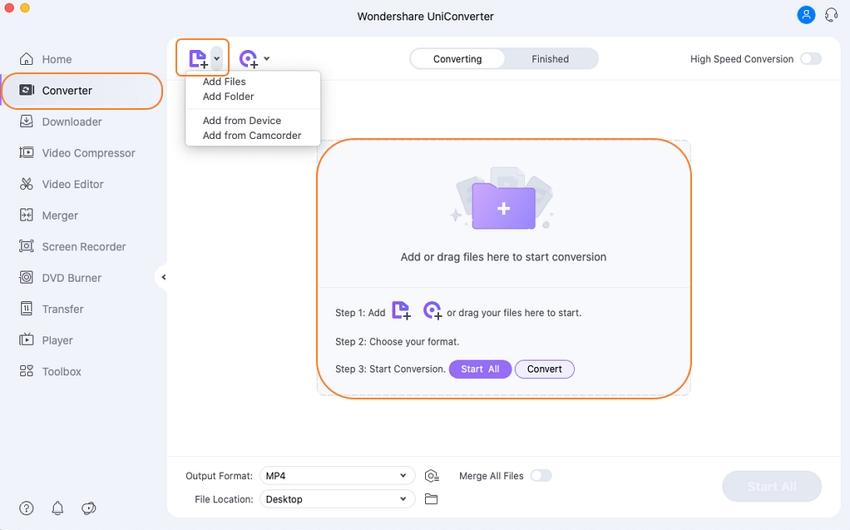
Free Download Free Download. How to Convert MPG to MOV on Mac/PC. To convert MPG to MOV on Mac OS including Catalina, Mojave, High Sierra, and Mountain Lion, you can rest assured to use Wondershare UniConverter for Mac. Now let's go to the step by step guide for MPG to MOV Mac conversion. Step 1 Import MPG Video to Wondershare Mac.
Download Video Converter:
How to Convert MPG videos to MOV on Mac
1Add videos
After downloading, install and run the MPG to MOV converter. Then click File > Add Video Files to add the MPG files you want to convert. Alternatively, you can drag videos directly to the left item bar. If you have many MPG video files and want to put them together to get a complete movie, you can check all the files and select Merge into One File.
2Edit your videos (Optional)
This Mac MPG to MOV converter comes with a built-in video editor that lets you touch up your videos in clicks. Trim, Crop, Rotation and Video Adjustments, etc. functions are provided for your choice. In video editing window, you can get the user-defined video as you need.
3Select MOV as the output format and start conversion
Next, turn to the format list at the bottom and select MOV from Video as the output format to convert your MPG video files to MOV on Mac (Lion and Mountain Lion included). As you see, in addition to MOV, almost all other regular output video formats are available. When all settings are OK, click the Convert button to start converting your videos.
Here is the video tutorial on how to convert MPG and MPEG videos to MOV:
What is MPG
MPG is technically the same as the more popular MPEG video formats. Created by Moving Pictures Experts Group, this is the file format that is regarded as industry standard. The format is a container file of audio, video, and data file systems, compressed and tested accordingly to produce high quality results. MPG is developed by ISO/IEC, and along with its associated file extensions, is the most preferred video format over the internet today.
What is MOV
Mpg To Video Converter Free
MOV is a video file format that works on fairly the same footing as the MPG. However, MOV is more native to Macintosh computers than the MPG file format. Therefore, it is quite safe to say that MOV is the video file for all Apple systems. It plays naturally in the QuickTime player, which is the multimedia player native to Apple devices.
MPG vs MOV
Free Mpg To Mov Converter For Mac Computer
MPG and MOV almost produce the same quality of images simply because they are created with the same platform. As a matter of fact, MOV is the basis used to create the MPG file format. The only difference is that MPG proves to have better support over the internet, as it is mostly associated with Windows-based system. Both video file systems also possess the capability to adapt lossy formats in order to trim down the file size. These two formats are highly portable video files, thus making them playable on almost all devices and gadgets. So if you are using an Apple device such as an iPhone, iPod, or iPad, go for MOV. For all other devices, MPG proves to be more compatible.