- Ipad Pro Pop Up Blocker
- Safari Turn Off Pop Up Blocker
- Disable Pop Up Blocker Mac
- Disable Pop Up Blocker On Apple Computer
- How To Allow Pop Ups On Mac
Pop-ups can be ads, notices, offers, or alerts that open in your current browser window, in a new window, or in another tab. Some pop-ups are third-party ads that use phishing tactics—like warnings or prizes—to trick you into believing they’re from Apple or another trusted company, so you’ll share personal or financial information. Or they might claim to offer free downloads, software updates, or plugins, to try to trick you into installing unwanted software.
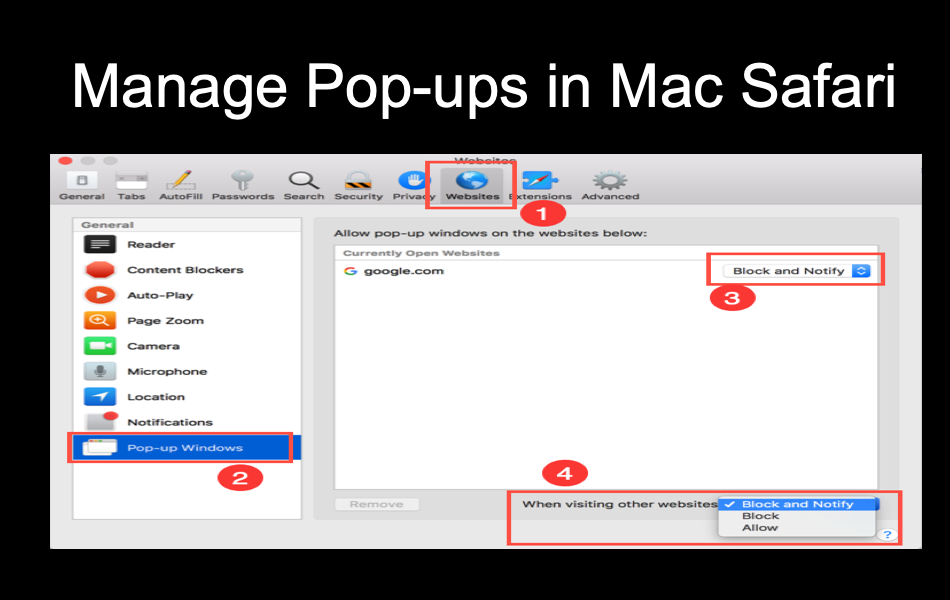
Make sure Safari security settings are turned on, particularly Block Pop-ups—for pop-up windows—and the Fraudulent Website Warning. On your iPhone, iPad, or iPod touch, go to Settings Safari and turn on Block Pop-ups and Fraudulent Website Warning. On your Mac, you can find these options in Safari Preferences. Here’s how to stop pop-ups on Mac: Open Safari. Click Safari on the top left. In the drop-down menu, click Preferences. You can also press command + comma (⌘ +,) to open Safari preferences. Click on the Websites tab on the toolbar at the top. On the left side, select Pop-up Windows. Better Pop Up Blocker Safari free download - Pop Up Blocker Pro, Pop Up Blocker Pro Rich Media Ads Edition, Pop-up Blocker, and many more programs. To Disable the Pop-up Blocker on Mac PC, Follow the Below Steps: Launch the Safari Browser and Click on ‘Safari’ available on Top-left Corner. Then Tap on Preferences in the Drop-down Menu. In the new window, Navigate to ‘Security’ to view the options. Here it will display Web Content Option. Adblock Plus, the most popular ad blocker on Firefox, Chrome, Safari, Android and iOS. Block pop-ups and annoying ads on websites like Facebook and YouTube.
Ipad Pro Pop Up Blocker
Unless you’re confident of an ad’s legitimacy, you should avoid interacting with pop-ups or webpages that seem to take over your screen. Here are additional tips that can help you manage pop-ups and other unwanted interruptions.
Check and update your software
Always make sure you install the latest software updates for all your Apple products. Many software releases have important security updates and may include improvements that help control pop-ups.
The safest place to download apps for your Mac is the App Store. If you need third-party software for your Mac, and it isn’t available in the App Store, get it directly from the developer or another reliable source, rather than through an ad or link.
Check Safari settings and security preferences
Make sure Safari security settings are turned on, particularly Block Pop-ups—for pop-up windows—and the Fraudulent Website Warning.
On your iPhone, iPad, or iPod touch, go to Settings > Safari and turn on Block Pop-ups and Fraudulent Website Warning.
On your Mac, you can find these options in Safari > Preferences. The Websites tab includes options to block some or all pop-up windows, and you can turn on fraudulent site warnings in the Security tab.
Pop-ups and ads in Safari
If you see an annoying pop-up ad in Safari, you can go to the Search field and enter a new URL or search term to browse to a new site. If you don’t see the Search field on your iPhone, iPad, or iPod touch, tap the top of the screen to make it appear.
Some pop-ups and ads have fake buttons that resemble the close button, so use caution if you try to close a pop-up or ad. If you're unsure, avoid interacting with the pop-up or ad and close the Safari window or tab.
On your Mac, you can also update your settings to prevent windows from opening again after you close Safari, or just press and hold the Shift key when you open Safari.
If you might have installed adware or other unwanted software on your Mac
If you see pop-ups on your Mac that just won’t go away, you might have inadvertently downloaded and installed adware (advertising-supported software) or other unwanted software. Certain third-party download sites might include programs that you don’t want with the software that you install.
If you think that you might have malware or adware on your Mac, update to the latest version of macOS. If your Mac is already running the latest version, restart it. macOS includes a built-in tool that removes known malware when you restart your Mac.
Check your Applications folder to see if you have any apps that you didn’t expect and uninstall them. You can also check the Extensions tab in Safari preferences to check if you installed any unnecessary extensions that you'd prefer to turn off. If you continue to see advertising or other unwanted programs on your Mac, contact Apple.
Learn more
- How to safely open software on your Mac
- How to recognize and avoid phishing and other scams
Download AdBlock for Safari for macOS 10.12.6 or later and enjoy it on your Mac. AdBlock has been downloaded more than 350 million times and is used by more than 65 million people worldwide. Now, AdBlock has created a powerful ad blocker that’s available as a Mac app. AdBlock for Safari is a powerful and simple-to-use ad blocker.
AdBlock for Safari 1.26.0 for Mac is free to download from our application library. Our antivirus scan shows that this Mac download is virus free. The program lies within Productivity Tools, more precisely General.
What does Adblock do you use in Safari?
AdBlock for Safari is a powerful and simple-to-use ad blocker. It stops annoying pop-ups, removes autoplay video ads and blocks obnoxious audio ads. It also gives you control over which ads you see and what websites you support.
How do I uninstall Safari Adblock?
Step 1: Open the Safari browser. Click the Safari menu at the top-left corner of your screen, followed by Preferences. Step 2: Go to the Extensions tab on the new window that pops up, then simply uncheck AdBlock and it will be disabled. Step 3: If you want to permanently remove AdBlock from Safari, click Uninstall.
What is the best ad blocker?
According to our testing, Ghostery is by far the best available ad blocker. Compatibility: Not only is Ghostery available for Chrome, Firefox, and Safari, you can also get it on Opera, Internet Explorer, and Edge.
AdBlock for Safari on the Mac App Store
Safari AdBlock 2.3 for Mac can be downloaded from our software library for free. The software relates to Internet & Network Tools. The software relates to Internet & Network Tools. The latest setup package takes up 1 MB on disk.
Key Features. Latest Version: 1.28.2. Licence: Free. What does AdBlock for Safari do? AdBlock has been downloaded more than 350 million times and is used by more than 65 million people worldwide. Now, AdBlock has created a powerful ad blocker that’s available as a Mac app. AdBlock for Safari is a powerful and simple-to-use ad blocker.
The 1.9.8.7 version of Safari AdBlocker for Mac is available as a free download on our software library. The file size of the latest downloadable installation package is 2 MB. The file size of the latest downloadable installation package is 2 MB.
Download Adblock Plus for Safari 1.12.4 for Mac for free, without any viruses, from Uptodown. Try the latest version of Adblock Plus for Safari for Mac
Apple Ad Blocker For Mac; Safari Adblocker For Mac; The 1.9.8.7 version of Safari AdBlocker for Mac is available as a free download on our software library. The file size of the latest downloadable installation package is 2 MB. The program lies within Internet & Network Tools, more precisely Browser extensions.
Safari AdBlock (free) download Mac version
Adblock For Safari removes Facebook ads, Flash animations, and ads from all over the Web on Apple's Safari web browser. Safari is automatically updated with additions to the filter.
It includes all the file versions available to download off Uptodown for that app. Download rollbacks of Adblock Plus for Safari for Mac. Any version of Adblock Plus for Safari distributed on Uptodown is completely virus-free and free to download at no cost.
Download Adblock Safari Mac Free Screen Recorder; Adblock For Safari Mac; Adblock For Macbook; How To Disable Adblock Mac; Download the latest version of Adblock Plus for Safari for Mac. Block annoying Internet ads on Safari. Adblock Plus is a useful tool to block, in one fell swoop.
Disable video auto-play. Download AdBlock Max 1.8 for Mac from our website for free. This Mac download was checked by our built-in antivirus and was rated as safe. This free software for Mac OS X was originally created by liao. The software belongs to Security Tools.
If you want to download the software on your windows pc or mac, you could either first visit the Mac store or Microsoft AppStore and search for the app OR you can easily use any of the download links we provided above under the 'Download and Install' header section to download the application. Adblock Plus for Safari ABP - Is it safe to download? Yes.
Safari AdBlocker (free) download Mac version
Download Adblock Plus, a free ad blocker for Safari, and block annoying ads, pop-ups, trackers & more! Fast ad blocker for macOS. Unfortunately, Safari AdBlocker is not compatible with Safari 5 or newer, fact that renders the utility useless for Mac users using newer versions of the web browser.
Adblock Plus, the most popular ad blocker on Firefox, Chrome, Safari, Android and iOS. Block pop-ups and annoying ads on websites like Facebook and YouTube.
Download AdGuard for Safari for macOS 10.13 or later and enjoy it on your Mac. More than 21,000,000 AdGuard users enjoy the better, faster, and safer Internet. The ad blocker extension clears all ads in Safari and fights data tracking to protect privacy.
Download Adblock Plus, a free ad blocker for Safari, and block annoying ads, pop-ups, trackers & more! Fast ad blocker for macOS. Safari AdBlocker is the only 64-bit ad blocker built for Mac OS X 10.5+ to integrate directly into Safari, for minimum disruption to your browsing experience.
Safari 13 is severely grippled Adblocker-wise, unfortunately. Switched to Chrome (+ uBlock Origin) because of that. Nothing from the Safari-Blockers comes even close. Tested AdGuard (blocked not as much, made browsing slower), 1Blocker, Wipr and others – nothing compares to uBlock Origin.
Ad Blocker For Mac Safari Free Download

Adblocker Safari Mac free download - Adblock Plus for Safari, Blocker: AdBlocker Safari Ads, AdBlocker for Safari Browser PRO, and many more programs
Jul 26, 2019 The 3.16.0 version of AdBlock for Mac is provided as a free download on our website. This Mac download was checked by our built-in antivirus and was rated as malware free. The actual developer of this Mac application is AdBlock. AdBlock for Mac is included in Internet & Network Tools.
uBlock, the fastest, most powerful ad blocker for Safari is here. uBlock blocks all annoying pop-ups and ads while you browse on your Mac. It’s simple, easy-to-install, and best of all- completely free. Download uBlock ad blocker for Mac and browse faster today.
We have listed the best Safari ad blockers that you could consider in selecting what is a perfect fit for an ad blocker for your Mac. AdBlock Max Its main function stated by its developers is to eliminate adverts from Facebook, and other websites, It could also optimize the speed of the website.
2. AdBlock Pro. Next up is AdBlock Pro, another app that easily makes to on this list of the best Safari ad blockers. This is a super robust option that removes ads of all kinds from all sorts of websites. It isn’t as flexible as AdGuard is, but by default, it’ll hide a lot more annoying content.
AdBlock For Safari
Download for Mac Block ads, trackers and pop-ups Magic Lasso Adblock is a free, efficient and high performance ad blocker for the iPhone, iPad and Mac with native Safari integration. AdBlock has been downloaded more than 250 million times and is used by more than 65 million people worldwide.
Faida continued, 'The Adblock Plus add-on works on all current versions of Safari and is backwards-compatible to version 6.0 (standard version with OSX Mountain Lion).
AdGuard Browser extension version 3.6. AdGuard Browser extension. AdGuard is the fastest and most lightweight ad blocking extension that effectively blocks all types of ads on all web pages! Choose AdGuard for the browser you use and get ad-free, fast and safe browsing. Read more.
Safari Turn Off Pop Up Blocker
Interacting with the AdBlock for Safari Mac app. AdBlock menu icon - located on the top menu bar - which has app information (version information & debug data), the ability to manage filter lists and quick access to allowlisted sites in AdBlock’s Settings window. This only displays when the AdBlock app is open.
Download Blocker: AdBlocker Safari Ads for iOS to stop hackers from spying on your data by blocking intrusive advertisements in Safari Browser.
Adblock Plus for Safari old versions
Read reviews, compare customer ratings, see screenshots and learn more about Adblock Plus for Safari ABP. Download Adblock Plus for Safari ABP for macOS 10.12.6 or later and enjoy it on your Mac.
5. AdGuard. 6. AdBlocker Ultimate. 1. Adblock Plus. Adblock Plus is quite a popular adblock for Safari 12 that you can use for free. The best thing about it is that it works across various browsers. Above all, it does a great task of blocking ads, pop-ups, and banners from videos and websites.
About AdBlock. We built AdBlock to provide a worry-free and distraction-free Internet experience for everyone. It is used by tens of millions of users worldwide on all major browsers in more than 30 languages. Created by Michael Gundlach in 2009, AdBlock is now one of the most popular browser tools in existence.
Disable Pop Up Blocker Mac
8. Ka-Block. Ka-Block is a free Ad Blocker for Safari Browser that consumes less RAM and offers a great surfing experience. It is one of the effective and open-sourced content blockers for Safari on macOS. It can block all ads and third-party tracking scripts from slowing down the websites you visit.
Download Adblock Google Chrome Mac Download Crystal Adblock for Samsung is an Android Productivity App that is developed by Murphy Apps and published on Google play store on Jan 23, 2016. It has already got around 500,000+ downloads so far with an average rating of 4.0 out of 5 in play store.
Adblock Plus for Safari 1.12.4 for Mac
What is Magic Lasso for Mac. Magic Lasso Adblock is a free, efficient and high-performance ad blocker. It allows you to experience a cleaner, faster web without intrusive ads. As a native Safari content blocking extension, Magic Lasso blocks ads, pop-ups, and trackers when browsing the web.
Downloading AdBlock One Free. Downloading. AdBlock One. Thank you for using our Mac software portal. Unfortunately, there is no direct download for the Mac version of AdBlock One. To download the application, proceed to the App Store via the link below.
Version: 1.22.0 | Licence: free | Size: 11 mb | Memory: 17 mb. AdBlock for Safari is practically equal to the previous extension: same workflow, similar test results. The only difference is less RAM load, in this case it is 17.1 MB. If you need an ad blocker for an older Mac, this option is perfect.
I used the free version of AdGuard on my iMac for a year or so and a free version of AdBlock on the MacBook. Of the two, I much preferred AdGuard. I liked it so much I ought a license in November 2019. The paid version is super powerful and efficient. So many features, so little money.
AdGuard for Safari is totally free. But AdGuard for Mac is a solution that is even more effective than AG Safari extension. It can filter the traffic in all browsers and apps on your Mac; has an unlimited number of filter rules; provides a better filtering quality. You can find the full comparison here.
Download Adblock Safari Mac Free
uBlock, the fastest, most powerful ad blocker for Mac is here. uBlock blocks all annoying pop-ups and ads while you browse on your Mac. It’s simple, easy-to-install, and best of all- completely free. Download uBlock ad blocker for Mac and browse faster today.
After discussing my iPhone issue I was transferred to another area of Tech Support to ask why Safari would just up and turn off AdBlock. I was told that a new version of Safari was download on 9/18 and that might be why Safari turned off AdBlock. I was advised to uninstall it so I did. Ever since, I have been bombarded with adds, pop-ups, etc.
Best ad blocker for Safari. Reader mode is a great solution, but if you want to block the adverts but leave the rest of the visual elements intact, you need to install a third-party ad blocker.
Adblock Plus is one of the best ad blockers for Safari and won the best free ad blocker roundup. It’s one of the most popular open-source browser extensions to block ads. The tool comes with a supported version of Chrome, Firefox, Safari, and Opera. There’s no complicated way to get this tool to work its magic.
Safari Description. Safari is a web browser developed by Apple Inc. and included in Mac OS X. It was first released as a public beta on January 7, 2003, and a final version was in

Download AdBlock for Safari for Mac
AdGuard for Safari (available in the app store) works pretty well for me, and it's free. I did add some non-default filter lists, but I think those weren't necessary for blocking youtube ads. The only small glitch is that recently I've sometimes had to reload a video once or twice so that it doesn't start with an ad.
1,694. Fort Worth, Texas. Sep 19, 2018. #11. Ad Block Plus was just updated last night and can be downloaded for free from the Mac App Store. I use that and Ka Block which was recommended. Also note that Safari 12 Preferences, 'Websites' has many new options which also includes 'Content Blockers'. Comment. M.
If you intend to remove detected therats instantly, then you will have to buy its licenses version that will activate the software fully. Special Offer (For Macintosh) If you are a Mac user and AdBlock Popup & Ads has affected it, then you can download free antimalware scanner for Mac here to check if the program works for you.
Cs 1.6 Mac Os Download Atlas At 250 Manual Excel Qm For Mac Content Pack - Europa Universalis IV: Emperor For Mac Install Office For Mac With Product Key Dramatical Murder Gameplay Design Doll Cracked Adblock For Opera Mac Adobe Reader Free Download For Mac Air Backyard Baseball 2003 Download Full Version Mac
Disable Pop Up Blocker On Apple Computer
Listen to background sounds to mask annoying noises and help you focus while you work, study or relax. Quickly search and insert beautiful free photos from Unsplash on any web page. Additor helps you to organize bookmarks and highlights from article, blog, PDF, and etc into notes. Clear the clutter.
Adblock Plus for Safari
How To Allow Pop Ups On Mac
6 Best Free Adblock for Chrome in 2021. Easeus data recovery wizard professional full version. AdBlock. AdBlock is the best ad blocker for Chrome and used by many people. You can find it in Chrome Web Store and click Add to Chrome button to easily add this best free adblock extension for Chrome.